Content mapping explained: from funnel grids to the page plan SEO teams use
Content mapping is the practice of planning which piece of content a business needs for each reader need, and where that content lives. In marketing teams, it means a grid of buyer personas against funnel stages. In SEO teams, it means a page-by-page plan of the whole website that pairs every URL with a target keyword and search intent. The plan also records what happens to each page next. This guide covers both versions and how AI search is changing the second one.
 Jevgenia PogadajevaCFO, Snoika · 7 min read

























Content mapping in one sentence
In marketing, content mapping matches each piece of content to the person it's for and the point in their buying decision where they'll need it. That's the definition you'll find in most content marketing strategy guides. SEO practitioners use the same term for something larger. Their content map is a topical plan of an entire website, one entry per page, built around what people search for. Snoika, an SEO and AI visibility platform, uses the SEO meaning. Its content map covers the whole site and is built for AI search, and every page in it lists the questions that page should answer in AI assistants. Before you reuse a template or a vendor's deliverable, check which meaning it follows.
The classic funnel-stage grid
The classic grid is a table with buyer personas down the side and funnel stages across the top. The consideration column sits between awareness and decision. Each cell holds the content that persona needs at that stage. A chief financial officer in the awareness column gets an industry report. In the decision column, the same person gets a pricing calculator or a case study.
The grid makes gaps visible. If one persona has five awareness pieces and nothing at the decision stage, the empty cell says so at a glance. Teams fill it with formats such as webinars or emails. Sales one-pagers also appear in the grid, and these formats never appear in search at all.
Before you trust a grid, first check whether the personas are evidence-based or guessed. Interviews and sales data provide that evidence. Second, does every cell point to a real asset you can link to?
Where the grid falls short
The funnel grid fails as a website plan because it omits keywords and URLs. It also lacks a record of pages that already exist. It tells you a persona needs a comparison guide without establishing whether anyone searches for that comparison or which URL the guide should sit on. It also leaves open whether an old blog post already competes for the same query.
Tim Soulo, CMO at Ahrefs, published a study of the Ahrefs index which found that 96.55% of pages get zero traffic from Google. A cell filled with a topic nobody searches for adds another page to that pile. In the Content Marketing Institute's 2025 benchmark of business-to-business (B2B) marketers, 42% blamed a lack of clear goals when their strategy rated moderately effective or worse.
So keep the grid for campaign planning. Your content marketing for SEO needs a different map.
Content mapping for SEO teams
For SEO teams, content mapping turns keyword and topic research into a list of pages. Each page targets one search intent and has a fixed place in the site's structure. The unit of the map is the URL. Each entry names the page and its core keyword, with the keyword's search volume and intent. It also records the action the team takes on the page.
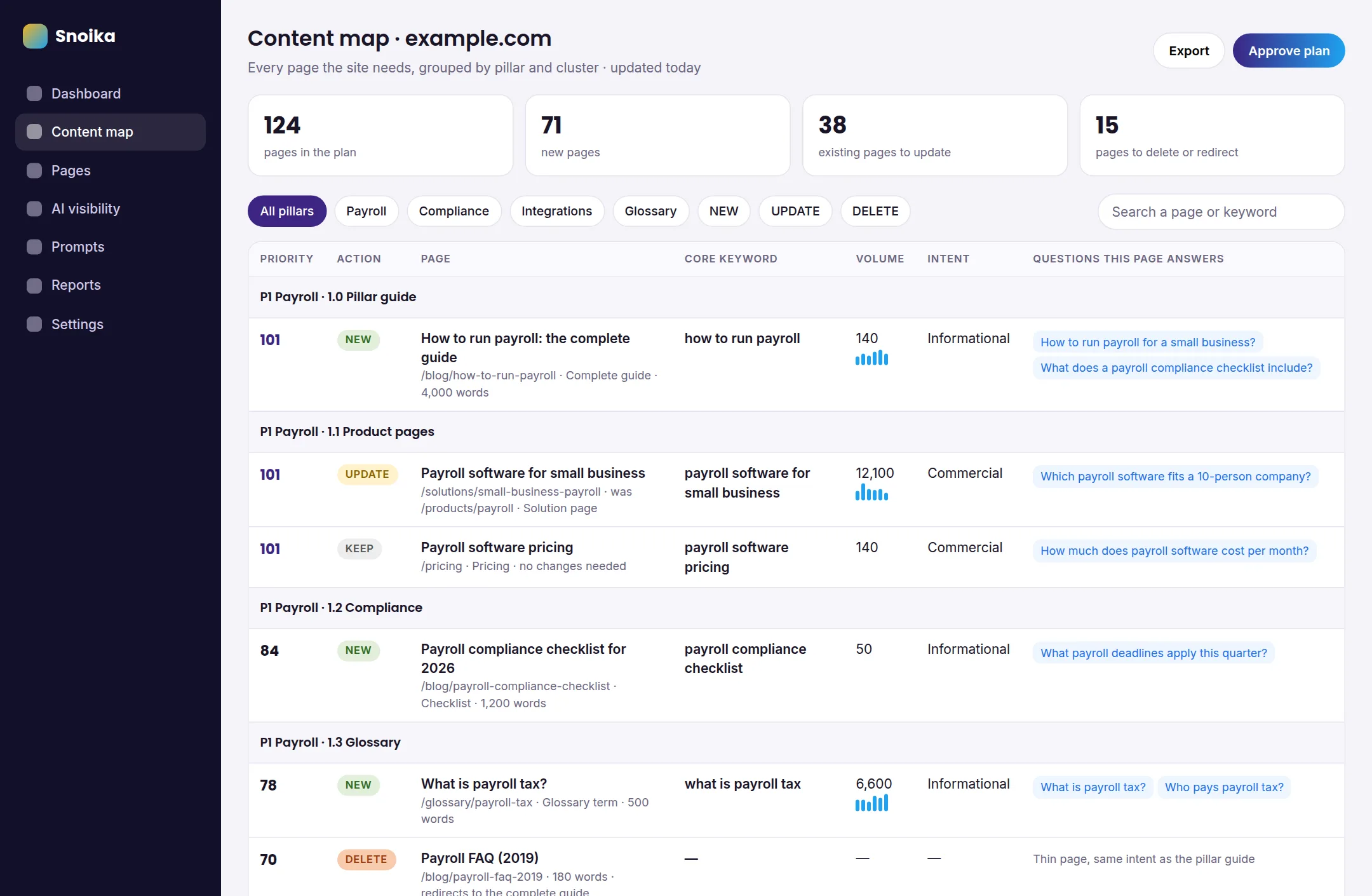
The structure is pillars and clusters. Cluster pages cover narrower questions within a pillar page's broad topic and link back to that pillar. This shows search engines how the site's knowledge fits together, and it stops two pages from chasing the same query.
What separates a working SEO map from a keyword list is that it covers the pages you already have. For each existing page, decide whether to keep or update it. Pages marked for removal get redirected or deleted. Snoika builds its maps this way, so new pages never compete with old ones. Before you publish anything new, find the existing URLs that target the same query and decide what happens to them.
Content map vs topical map
A topical map identifies the topics and subtopics a site needs to cover to show authority on a subject, while a content map turns that research into pages with URLs and actions. The two get confused because SEO content maps are built on top of topical maps, and some teams use the terms for the same document. The table compares them with the funnel grid and an editorial calendar, the other plan people mix them up with.
| Attribute | Funnel-stage grid | Topical map | SEO content map | Editorial calendar |
|---|---|---|---|---|
| Basic unit | Content asset | Topic or subtopic | Page (URL) | Publishing slot |
| Organized by | Persona and funnel stage | Topic hierarchy | Pillar and cluster | Date |
| Includes keywords and volumes | Rarely | Usually | Yes | Sometimes |
| Covers existing pages | No | No | Yes, with an action per page | No |
| Main question it answers | What does this buyer need now? | What must we cover? | Which page does what, and what do we change? | What goes live when? |
Basic unit
- Funnel-stage grid
- Content asset
- Topical map
- Topic or subtopic
- SEO content map
- Page (URL)
- Editorial calendar
- Publishing slot
Organized by
- Funnel-stage grid
- Persona and funnel stage
- Topical map
- Topic hierarchy
- SEO content map
- Pillar and cluster
- Editorial calendar
- Date
Includes keywords and volumes
- Funnel-stage grid
- Rarely
- Topical map
- Usually
- SEO content map
- Yes
- Editorial calendar
- Sometimes
Covers existing pages
- Funnel-stage grid
- No
- Topical map
- No
- SEO content map
- Yes, with an action per page
- Editorial calendar
- No
Main question it answers
- Funnel-stage grid
- What does this buyer need now?
- Topical map
- What must we cover?
- SEO content map
- Which page does what, and what do we change?
- Editorial calendar
- What goes live when?
The calendar comes last. Schedule pages after you've defined them in the map.
How AI search changes mapping
AI search adds a column for the questions each page should answer when someone asks an AI assistant. Readers now get answers before they click. In July 2025, Alphabet CEO Sundar Pichai said AI Overviews had over 2 billion monthly users. In October 2025, OpenAI's Sam Altman put ChatGPT at 800 million weekly users.
Pew Research Center tracked 900 U.S. adults and found they clicked a traditional result in 8% of visits with an AI summary, against 15% without one. When Ahrefs reran its study on December 2025 data, it found the top-ranking page earned a 58% lower clickthrough rate when an AI Overview appeared.
Each page lists the prompts buyers type into ChatGPT and Google AI Overviews, as every page in a Snoika map does, so writers know which answers to state plainly. Google's documentation on AI features and your website says the same SEO best practices apply to AI Overviews as to regular search.
Building the map in order
Build an SEO content map by setting goals before research. Use that research to make page decisions.
- Set the scope. Write down the site's goals and the markets it should serve. Record the languages it should serve as well. Connect Google Analytics 4 (GA4) and Google Search Console so the map starts from real traffic.
- Research keywords. Pull live search volumes and study the search engine results pages (SERPs) for each target query. The SERP shows which page type Google rewards.
- Research topics. Group keywords into subjects and find the questions buyers ask. Include the prompts they type into AI assistants.
- Check market demand. Compare volumes across countries and languages before you plan translated or local pages.
- Audit the current site. List every URL, then flag technical issues and cannibalization, where two pages compete for one query.
- Group and assign. Sort pages into pillars and clusters. Give each page a single action and a priority score. The action can be new or update. The other options are keep or delete.
Snoika follows the same order. Its basic build needs only a website link and a brand name and takes up to 4 hours. A more precise map also uses goals and target markets. It draws on access to GA4 and Search Console as well.
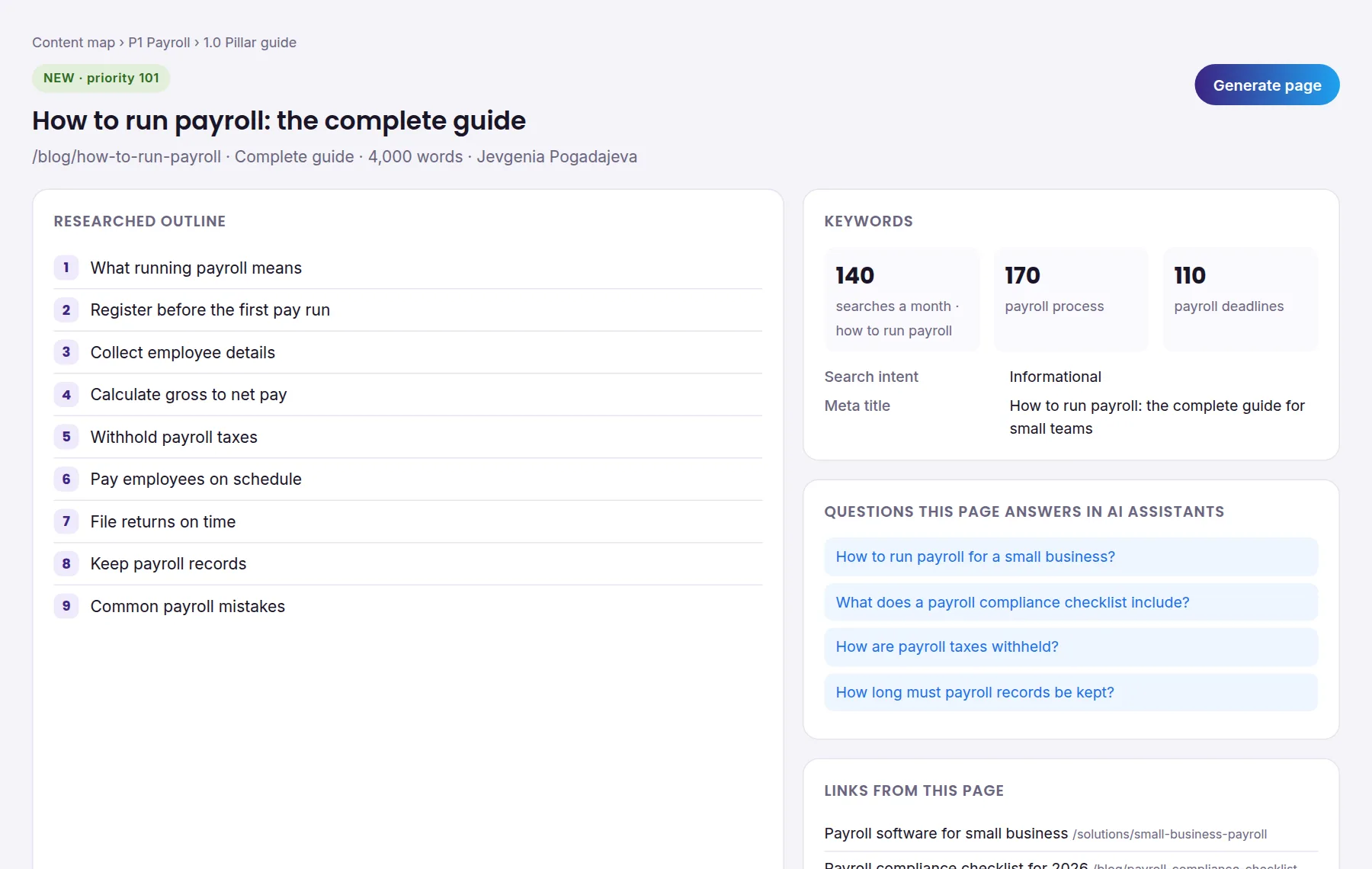
A content map example
A content map example is a table where each entry is one page and each column is a decision about it. Picture a payroll software company with a pillar on payroll compliance.
| Cluster | Action | Page type | URL | Core keyword | Search intent | AI question the page answers |
|---|---|---|---|---|---|---|
| Overview | UPDATE | Pillar guide | /payroll-compliance | payroll compliance | Informational | What does payroll compliance cover for a small business? |
| Deadlines | NEW | Checklist | /payroll-compliance/deadlines | payroll tax deadlines | Informational | When are quarterly payroll taxes due? |
| Contractors | NEW | Comparison | /payroll-compliance/contractor-vs-employee | contractor vs employee | Informational | How do I know if a worker is a contractor? |
| Deadlines | DELETE | Old blog post | /blog/tax-dates-2021 | payroll tax dates | Informational | (redirect to the deadlines page) |
Overview
- Action
- UPDATE
- Page type
- Pillar guide
- URL
- /payroll-compliance
- Core keyword
- payroll compliance
- Search intent
- Informational
- AI question the page answers
- What does payroll compliance cover for a small business?
Deadlines
- Action
- NEW
- Page type
- Checklist
- URL
- /payroll-compliance/deadlines
- Core keyword
- payroll tax deadlines
- Search intent
- Informational
- AI question the page answers
- When are quarterly payroll taxes due?
Contractors
- Action
- NEW
- Page type
- Comparison
- URL
- /payroll-compliance/contractor-vs-employee
- Core keyword
- contractor vs employee
- Search intent
- Informational
- AI question the page answers
- How do I know if a worker is a contractor?
Deadlines
- Action
- DELETE
- Page type
- Old blog post
- URL
- /blog/tax-dates-2021
- Core keyword
- payroll tax dates
- Search intent
- Informational
- AI question the page answers
- (redirect to the deadlines page)
The 2021 post would have competed with the new deadlines page, so the map retires it and sends its traffic to the new page. A full map adds columns for volume and priority, along with a separate column for secondary keywords. It repeats this layout for every pillar.
Free content mapping template
A content mapping template gives you the columns ready-made, so the work goes into research. Snoika's free content map template is a spreadsheet that opens in Excel and Google Sheets. It has an implementation plan tab and two example pillar tabs with five pages each. A master tab holds priority scores. The plan tab records scope and research findings. Each finding is labelled Gem or Discovery, with Observation as the other label. The tab also records issues rated Critical or High, with Medium and Low as the other ratings.
The pillar tabs use Cluster and Action columns to organize pages. Action values are NEW or UPDATE, with KEEP and DELETE as the other options. Page type records the format, while URL and Current URL record addresses. Core keyword and Secondary keywords record the targets. Monthly search volume and Search intent describe the search demand. Priority score and Meta title complete the columns. Whatever template you use, check that it has a Current URL column. Without one, you can't record redirects.
Common content mapping mistakes
A content map needs to plan the whole site to avoid the mistakes that come from a focus on new ideas alone.
Mapping only new pages
A map that ignores existing URLs creates cannibalization. Your new guide and a five-year-old post end up splitting the same query, and neither ranks well. Audit first and plan second.
One page per keyword variant
"Content map template" and "content mapping template" share one intent. Two pages for them compete with each other. Group close variants under one core keyword, as keyword mapping does, and list the rest as secondary keywords.
Guessing intent instead of checking the SERP
If Google ranks product pages for a query, a blog post won't break in. Base the page type column on what you saw in the results.
Treating the map as finished
Search volumes and AI answers change as competitors publish. Review priority scores every quarter, and add the prompts your buyers have started asking.
When this matters for you
Content mapping matters most when your site keeps growing and its traffic doesn't. That pattern means pages are competing with each other or targeting queries nobody asks. Start with the existing pages before you plan new ones, because the delete and redirect decisions recover traffic faster than new content does. A map only pays off once its pages go live, so Snoika publishes pages from the map on the client's own domain through a DNS connection. The client approves each page before it's published. To see how your brand shows up in Google and AI assistants today, get a free AI visibility report.
FAQ
Content mapping in marketing matches content to a buyer persona and their stage in a buying decision. To assess whether a map is useful, check that its personas reflect interviews or sales data and that each filled cell points to an existing asset.
It assigns each planned or existing page a target search intent and a next action. Close keyword variants belong on the same page when they serve the same intent, so the map shouldn't automatically create a separate URL for every keyword.
AI search adds the questions each page should answer for people using AI assistants. These questions help writers state relevant answers plainly. Google's guidance says the same SEO best practices apply to AI Overviews as to regular search.
A content map looks like a spreadsheet with one row per page. For example, a payroll map could assign a new checklist to /payroll-compliance/deadlines and redirect an outdated tax-dates post there. This records what to publish and what happens to the existing page.
Prepare your site's goals and target markets, along with a list of existing URLs. Access to Google Analytics 4 and Search Console helps ground decisions in current traffic. Include language requirements if the site serves readers in multiple languages.
Keep reading
All articles