Topical map vs content map: which plan your website needs
A topical map and a content map are the same kind of plan, but they cover different amounts of your site. Pick a topical map for a list of subtopics to write about when you launch a new site or move into a subject you've never covered. Pick a content map if your site already has pages, because it also decides what happens to each of them. A content map becomes more important as the number of existing pages grows.
 Jevgenia PogadajevaCFO, Snoika · 6 min read

























Same plan, different names
In SEO, both names describe a plan that groups pages around subjects so search engines read the site as an authority on those subjects. "Topical map" grew out of semantic SEO, a field shaped by Koray Tuğberk Gübür, founder of the agency Holistic SEO & Digital. "Content map" comes from content marketing, where teams once mapped articles to the stages a buyer goes through.
The scope of the deliverable depends on who builds it. Snoika, an SEO platform, calls its deliverable a content map because the plan covers the whole website. Every existing page gets a verdict, and every new page gets a place in a pillar and a cluster. Another agency sells a plan of the same scope under the name topical map. Before you pay for either, ask for a sample and check whether it lists your current URLs.
What a topical map covers
A topical map covers the subtopics and questions a site has to answer before search engines treat it as an authority on one topic. It starts from a seed topic, such as "home espresso". From there it branches into a core section, which holds the things you sell or know best, and outer sections that give context. Each planned article gets a target query and suggested headings. It also lists the links it should send to related articles.
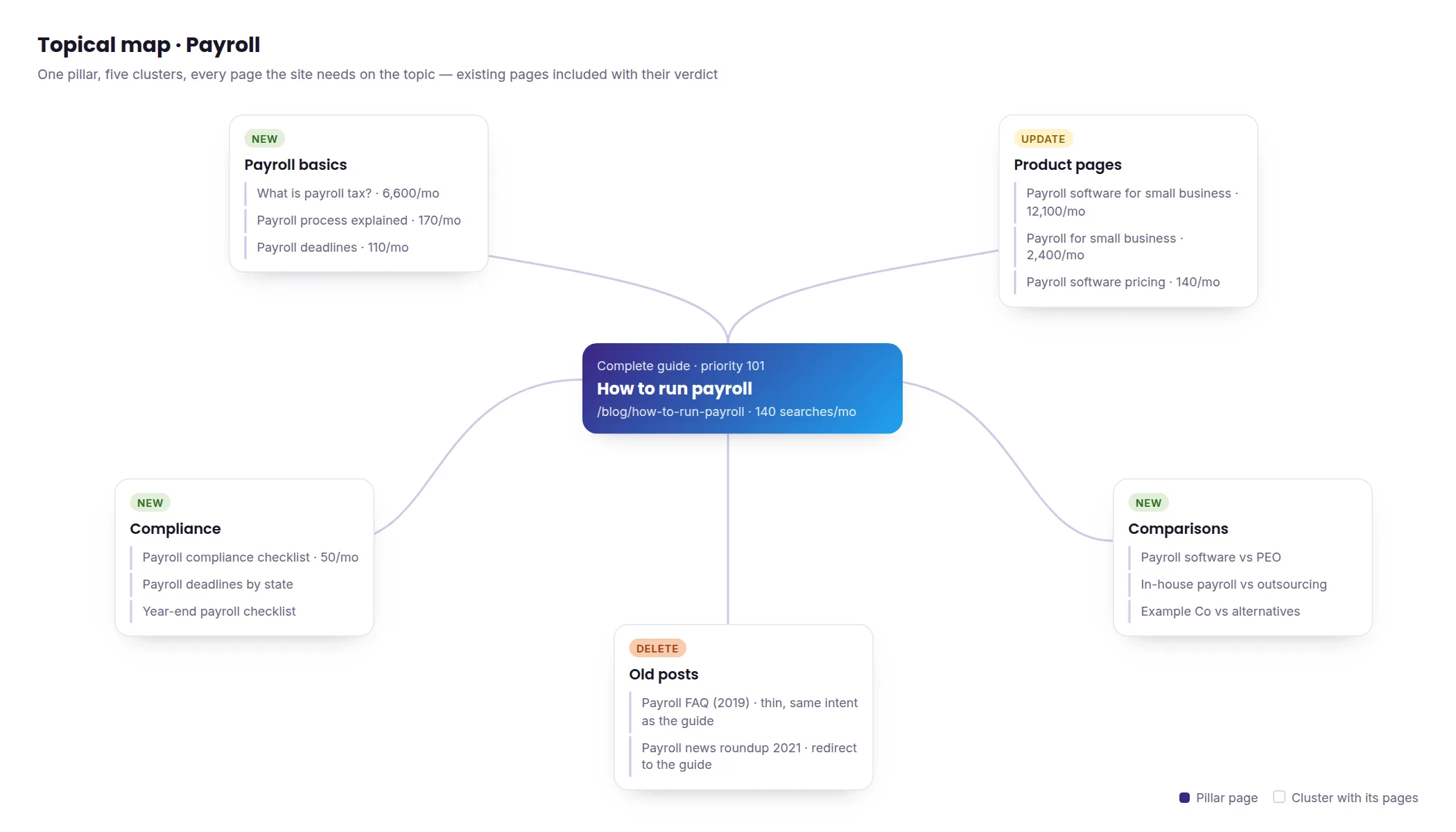
Gübür sums up the method's focus on coverage as "Rank topics, not keywords," and defines topical authority as coverage plus historical data. A topical map handles the coverage half. Historical data builds up only after you publish and keep publishing.
A topical map for a narrow niche needs a few dozen articles. A medical or legal subject can need hundreds, because each condition or statute brings its own questions. A topical map leaves out your existing URLs along with commercial pages for services or products. It also says nothing about old content. So check that every planned article targets a different search intent. Two articles that answer the same question will compete with each other once both go live.
What a content map covers
A content map assigns an action to every current and planned page across the whole website. That includes service pages alongside the blog. Product and category pages are covered too. In older content marketing usage the term meant a grid of articles by funnel stage, but SEO teams now use it for a full site plan (content mapping explained covers both meanings).
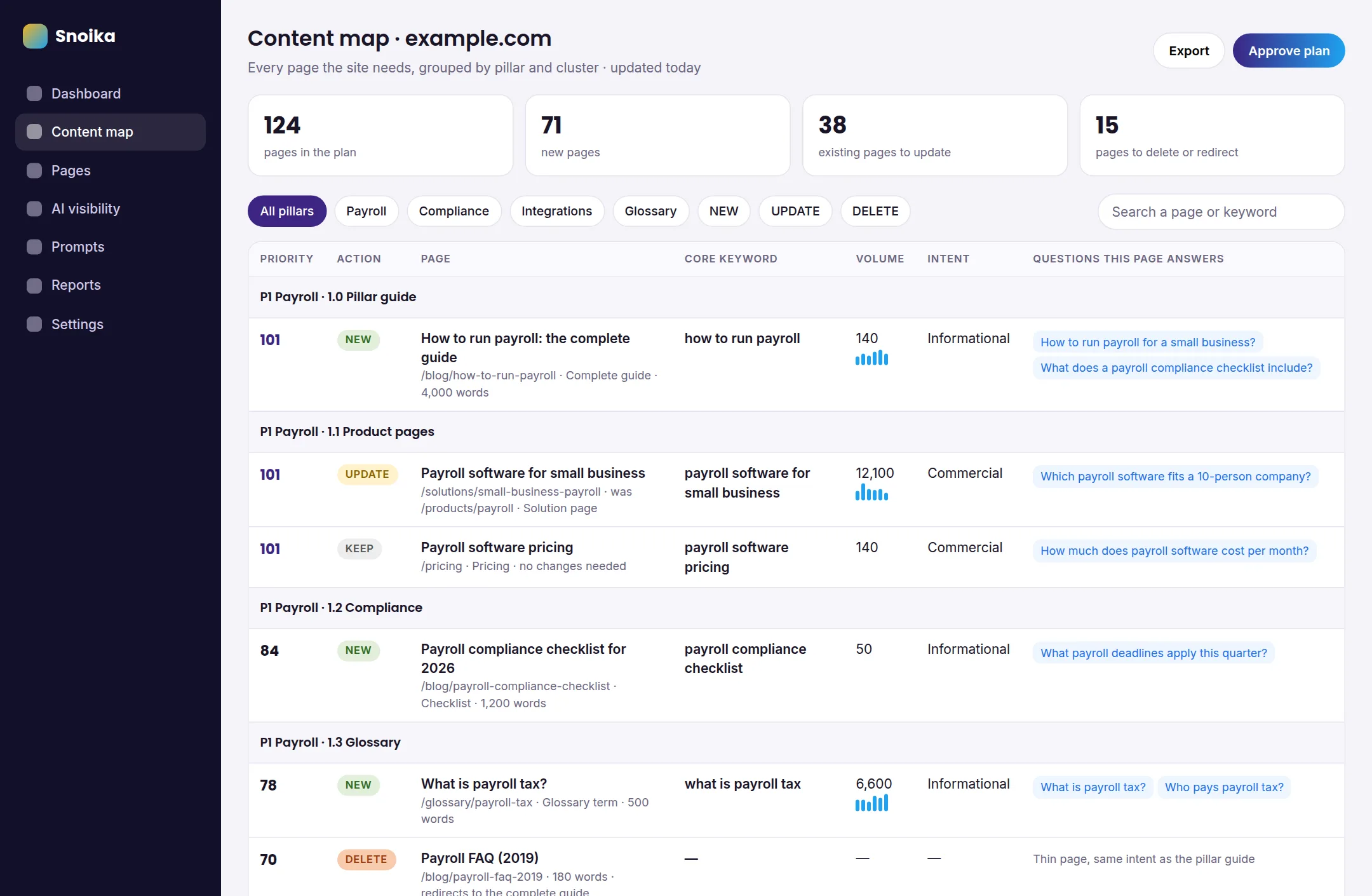
Snoika's plan lists every page a website needs to be found in Google and cited by AI assistants. Pages from the current site sit next to new ones, grouped by pillars and clusters, and each page has an action attached. You delete thin pages from the current site. Or you create new pages for keywords your competitors haven't used yet.
You'll judge a content map by whether you can act on it. Open the file and look for your money pages. Check that each one has a single action and that it belongs to one cluster. Then check that new pages link back to an existing pillar. If your pricing page or your best-selling category is missing, the map was built as a list of blog topics and named after the bigger job.
Where the two differ
A topical map plans what to write about one subject, while a content map plans for both new and existing pages across the whole site. The table sets them side by side.
| Attribute | Topical map | Content map |
|---|---|---|
| Starting point | A seed topic | Your current site plus the topic |
| Existing pages | Usually not listed | Every URL gets an action |
| Page types | Mostly articles | Services, products, categories, articles |
| Planning unit | Subtopic and query | Page, with its pillar and cluster |
| Main limit | Ignores what's already live | Takes longer to build on large sites |
| Best fit | New sites, new subjects | Sites with an archive to fix or grow |
Starting point
- Topical map
- A seed topic
- Content map
- Your current site plus the topic
Existing pages
- Topical map
- Usually not listed
- Content map
- Every URL gets an action
Page types
- Topical map
- Mostly articles
- Content map
- Services, products, categories, articles
Planning unit
- Topical map
- Subtopic and query
- Content map
- Page, with its pillar and cluster
Main limit
- Topical map
- Ignores what's already live
- Content map
- Takes longer to build on large sites
Best fit
- Topical map
- New sites, new subjects
- Content map
- Sites with an archive to fix or grow
Existing pages and cannibalization
A topical map treats the site as a blank page, so a new article can end up chasing the same query as a post you published three years ago. When two of your own URLs split the signals one page should get, that's cannibalization. In a content map, each existing page gets a decision about whether to keep or update it. Pages that won't stay are redirected or deleted. That way new pages never compete with old ones.
Page types beyond articles
A topical map is mostly an editorial plan. It tells writers what to write. A content map also covers pages writers rarely touch, such as service pages and category listings. Those are the pages that convert. When they sit in the same plan as the articles, the internal links point toward revenue and away from dead ends.
How each one gets used after delivery
A topical map goes to the writing team as a publishing schedule. A content map guides developers' redirects and editors' updates. Writers also use it for new pages. Ask who on your side will carry out each column. If nobody owns redirects, a content map's biggest benefit stays on paper.
Which one AI search rewards
A content map helps AI search visibility more, as long as it ties each page to the questions people ask assistants. A topical map gets partial credit because it builds coverage, and AI systems lean on coverage. Elizabeth Reid, Google's Head of Search, explained at Google I/O 2025 that AI Mode uses a "query fan-out technique" that ["break[s] the question into different subtopics"](https://www.rizenmetrics.com/google-ai-features-and-your-website-what-site-owners-actually-need-to-know-in-2026) and runs a large number of searches at once. A site that answers each subtopic gives the system more pages it can cite.
Rankings alone explain less than they used to. A March 2026 Ahrefs analysis of 863,000 keywords found that only 38% of AI Overview citations came from pages in Google's top 10 for the same query. In Ahrefs' July 2025 study, the share was 76% of cited pages. Pages further down now get cited when they answer one of those sub-questions directly.
A full content map extends that coverage across the site. Every page in it carries the questions buyers type into ChatGPT and Google AI Overviews that the page should answer. Writers then build each page around those answers. To check a map, take five real prompts from your sales calls and see whether the map names one page that answers each of them.
Side-by-side example
Picture a dental clinic with a four-year-old blog that wants more patients for teeth whitening. A content map for the clinic lists the same new "teeth whitening" articles as a topical map. It also works through the URLs the clinic already has. The table shows the same subject under both plans.
| Page | Topical map entry | Content map entry |
|---|---|---|
| /services/teeth-whitening (live) | Not listed | Keep as pillar, add answers to buyer questions |
| /blog/whitening-at-home (live) | Not listed | Update and move into the whitening cluster |
| /blog/best-whitening-strips-2019 (live) | Not listed | Redirect to /blog/whitening-at-home |
| /blog/clinic-holiday-party (live) | Not listed | Delete, since it's thin and off-topic |
| How long whitening lasts (new) | Planned article | Create under the whitening pillar |
| Whitening for sensitive teeth (new) | Planned article | Create, link to the service page |
/services/teeth-whitening (live)
- Topical map entry
- Not listed
- Content map entry
- Keep as pillar, add answers to buyer questions
/blog/whitening-at-home (live)
- Topical map entry
- Not listed
- Content map entry
- Update and move into the whitening cluster
/blog/best-whitening-strips-2019 (live)
- Topical map entry
- Not listed
- Content map entry
- Redirect to /blog/whitening-at-home
/blog/clinic-holiday-party (live)
- Topical map entry
- Not listed
- Content map entry
- Delete, since it's thin and off-topic
How long whitening lasts (new)
- Topical map entry
- Planned article
- Content map entry
- Create under the whitening pillar
Whitening for sensitive teeth (new)
- Topical map entry
- Planned article
- Content map entry
- Create, link to the service page
The two plans agree on the new articles, and that's where the topical map earns its place. It found the right questions. The content map addresses the outdated 2019 review alongside the fresh whitening content and directs readers to the page that books appointments. A writer can carry out the topical map alone, while the content map needs someone with access to the site's redirects.
Which plan your site needs
Your site needs a topical map if it's new or entering a subject it has never covered, and a content map once it has pages worth keeping or fixing. With no archive, there's nothing to audit, so a list of subtopics gets you writing sooner. Once you've published for a year or two, old pages start to shape how search engines judge the new ones.
Google's Search Central blog links high amounts of unhelpful content to poorer content performance across a site and identifies removal of unhelpful content as a way to help the rankings of other content. HubSpot acted on that logic when it removed 3,000 pieces of outdated content from its blog.
Choose a content map if one or more of these describe your site:
- You have more than a handful of blog posts, and you're not sure which ones still bring traffic.
- Two or more of your pages target the same search.
- Your service or product pages get few internal links from the blog.
- You want to be cited by AI assistants for the questions your buyers ask.
Our verdict
If your site already has pages, build a content map. The topical map vs content map choice only goes the other way for a brand-new site or a subject you've never written about. Even then, plan to turn the topical map into a content map within a year, once your first articles are live and start competing with whatever you publish next. Start today on your own with an export of every URL from Google Search Console. Next to each URL, write an action and the question that page should answer. That sheet tells you which plan you need.
FAQ
The topical map vs content map distinction is scope: a topical map plans coverage of one subject, while a content map also assigns actions to existing pages. For a site with an archive, check whether the plan includes current URLs.
They're the same kind of planning document, but the names don't guarantee the same deliverable. Providers use these labels differently. Check a sample to see whether it covers existing pages or only proposes new articles.
A content map helps more when it connects pages across the site to questions people ask AI assistants. Check it against five real buyer questions and confirm that each has a page assigned to answer it.
A site needs a topical map when it's new or entering a subject it hasn't covered. If other pages are already live, compare proposed articles against them before publishing so two pages don't end up answering the same question.
Prepare an inventory of every live URL, including commercial pages alongside articles. Add the question each page should answer and its proposed action. Identify who can carry out page changes and who has access to manage redirects.
Keep reading
All articles