WordPress SEO checklist to make your site ready for AI answers
A WordPress SEO checklist for AI answers is an ordered audit. It checks whether AI assistants can fetch your pages and trust what they say before you rewrite any content. Start with crawler access and indexability. Then check entity names and schema. Internal links and answer-first copy come last. ChatGPT and Google AI Overviews can't quote a page they can't reach, however well it's written.
 Artem LozinskyOperations and product, Snoika · 7 min read

























Audit order for AI answers
Audit the problems that block access first and polish content last. Each layer depends on the one below it. When we onboard a site, we first ask for access to Google Analytics 4 (GA4) and Google Search Console. Google Tag Manager access is part of that initial request too. Those accounts show which pages already earn traffic, and that's where the audit should start. Run the checks in this order:
- List the 20 to 30 pages that earn revenue or show your expertise.
- Confirm AI crawlers can reach those pages and read them as plain HTML.
- Check that each page can be indexed and shown with a snippet.
- Make your brand and product names identical on every template. Keep author names consistent across templates too.
- Validate the schema on those pages against what the page shows.
- Point internal links at the priority pages.
- Rewrite the opening of each section so it answers one question directly.
The audit order stays consistent across sites. A site with clean access can move faster through steps 2 and 3, but it still shouldn't skip them.
Crawler access fixes first
AI assistants face three barriers to citing a WordPress site when robots.txt rules and firewall defaults restrict access or content only appears after JavaScript runs. Googlebot renders pages and AI crawlers mostly don't. So a page can rank well in Google and still look empty to the systems that write answers about your category.
Does robots.txt allow the search crawlers?
OpenAI runs separate crawlers for model training and for search, and you control each one separately in robots.txt. OpenAI's crawler documentation says that sites opted out of OAI-SearchBot "will not be shown in ChatGPT search answers." If you want to block training, block GPTBot and leave OAI-SearchBot open. Then open yoursite.com/robots.txt and read every Disallow line. Plugins and old staging setups leave broad rules behind.
Is your CDN or security plugin challenging AI agents?
Bot protection can block AI crawlers before robots.txt even comes into play. On July 1, 2025, Cloudflare started to block AI crawlers by default for new domains, and security plugins rate-limit user agents they don't recognize. Your visitors see nothing wrong while the crawler gets a 403 error. Check your firewall logs for GPTBot and OAI-SearchBot requests and their response codes. Check PerplexityBot requests the same way.
Can crawlers read the page without JavaScript?
Standard WordPress themes render on the server in PHP, which is why the platform passes this check. Headless builds don't, and neither do tab or accordion blocks that load text on click. Vercel's study with MERJ found that ChatGPT and Claude don't execute JavaScript, even though they download the files. To test a page, load it with JavaScript turned off or view the raw source. If your key answer isn't in the HTML, those crawlers can't see it.
Indexability signals that matter
A page has to be indexed and allowed to show a snippet before Google will cite it in an AI feature. Google's guidance on AI features says a supporting link in AI Overviews must be indexed and eligible for snippets, "There are no additional technical requirements." That means a nosnippet or max-snippet:0 directive left in a template removes a page as completely as a noindex tag does.
WordPress creates archive and tag URLs on its own, along with URLs for attachments. SEO plugins decide which of these URLs get noindexed. Some of those exclusions you chose and others a plugin chose for you, so check which is which. Also confirm that "Discourage search engines" under Settings > Reading is off. People forget it after a site launches.
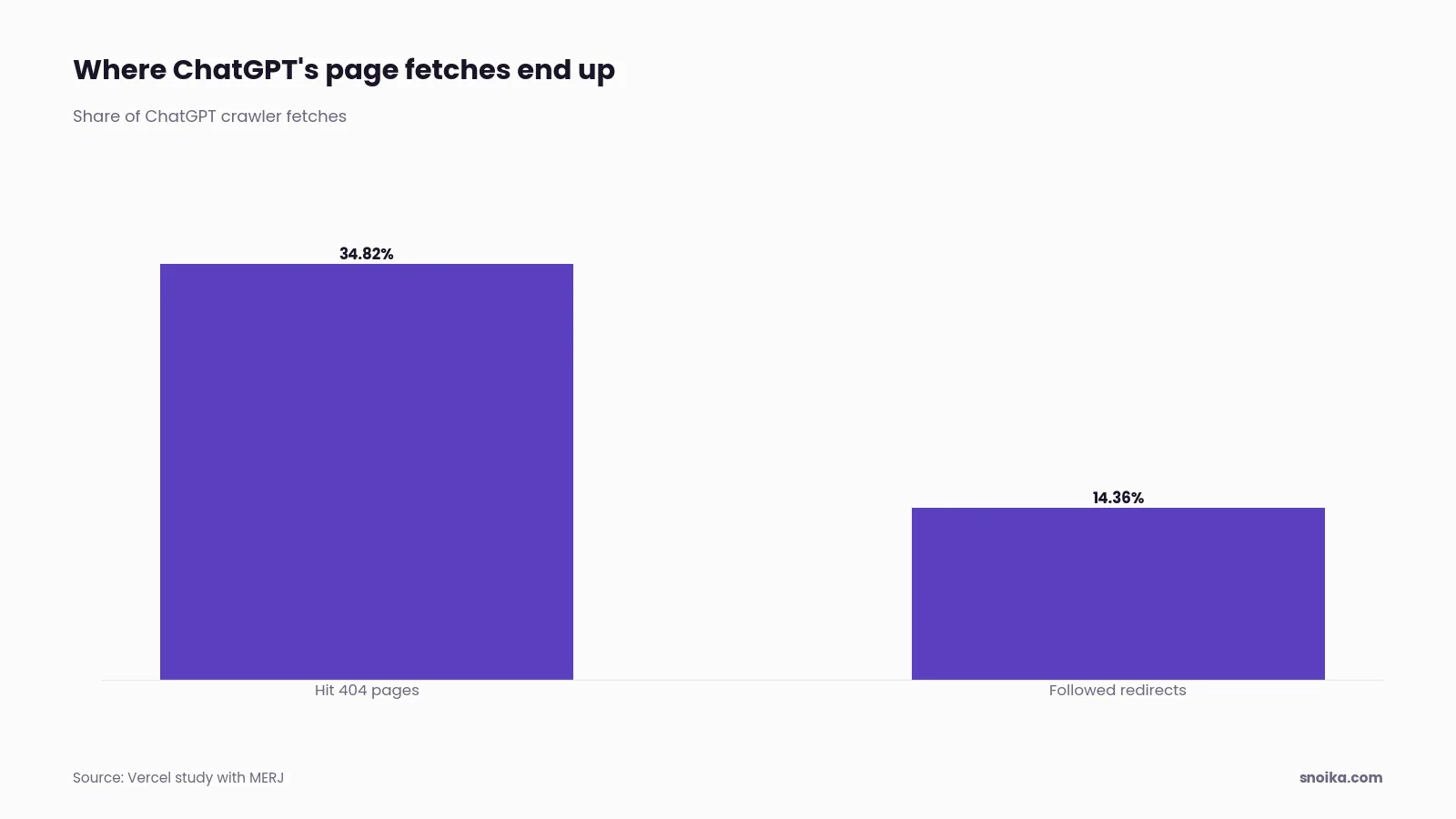
Stale URLs waste crawl budget. In the same Vercel analysis, 34.82% of ChatGPT's fetches hit 404 pages and another 14.36% followed redirects. Make sure your XML sitemap lists only live canonical URLs that return a 200 status. ABS Technologies, one of our clients, improved keyword indexability and significantly increased search visibility within the first 30 days, with 6x SERP impressions.
Entity consistency across your site
AI systems put together a picture of your company from every page they read. If you give them conflicting names, they treat you as two different entities. A brand that's "Acme Analytics" in the footer and "Acme" in the schema leaves the model to work out whether those are the same company. Your product names and author bylines need the same treatment.
Check the site title under Settings > General and the author display names in each user profile, then review the About page and the Organization schema to cover all four places. Each should use the same legal or trading name and address. The founding details should match too. If your Head of Product writes posts, keep their full name and job title consistent on every byline, with a link to the same author page each time.
Schema markup for AI citations
For AI visibility, WordPress needs Organization markup on the home page and Article markup with a named author on every post. Add more types only where the page content supports them. Google's own guide says no special schema.org markup is required for its AI features. At SMX Munich in March 2025, Fabrice Canel, Principal Product Manager at Microsoft Bing, confirmed that schema helps Microsoft's LLMs understand content for Copilot.
The types worth checking on a typical WordPress site are:
- Organization, with sameAs links to your official profiles
- Article or BlogPosting, with author set to a Person
- BreadcrumbList on posts and service pages
- Product or Service on pages that describe one
- FAQPage, only where the questions and answers appear on the page
The first of two schema errors occurs when two plugins each output their own schema graph, so the page contains duplicate Organization nodes. The second is that the markup claims things the page doesn't show. Run each priority URL through a schema validator and compare the result with the page.
Internal links that pass authority
Internal links tell crawlers which pages matter most. Every priority page needs links from related posts and hub pages, with anchor text that names the topic. A service page that's only linked from the main menu gets the same weight as your privacy policy.
Find orphan pages first by checking for URLs in the sitemap that no post links to. Then check for links from related-post widgets or mega menus that load with JavaScript, since these give AI crawlers nothing to follow. Links written into the post body are more reliable. Use anchors that say what the target page covers, such as "VAT registration thresholds", and drop vague ones like "learn more".
Quotable answers AI can extract
For quotable AI content creation on WordPress, open each section with one sentence that fully answers the question in its heading. Then back that sentence with a number or a named source. A direct quote also provides support. AI systems lift short, self-contained passages. If the answer is spread over three paragraphs, the model has to rebuild it, which gives a competitor's clearer version an advantage.
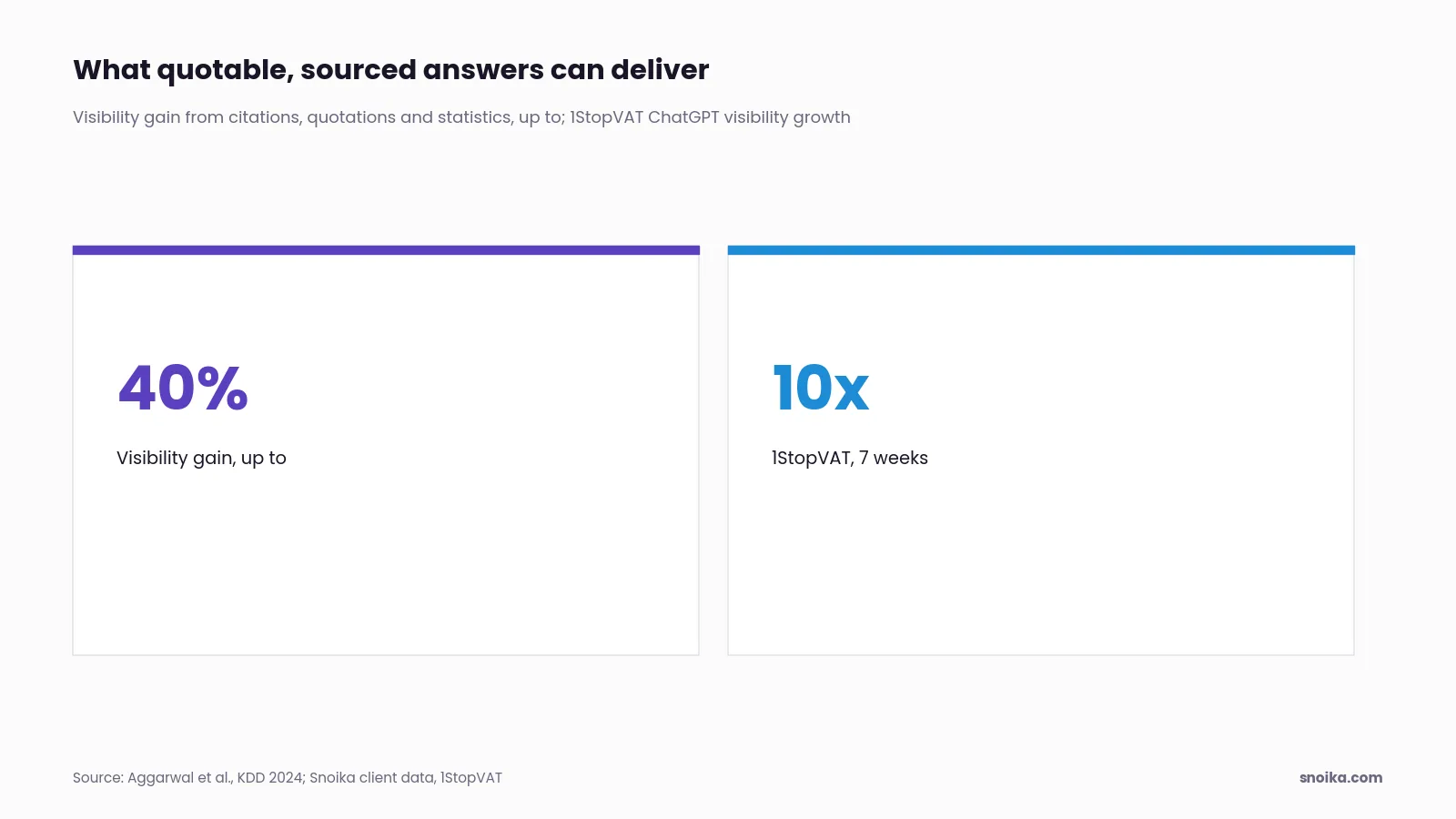
The Princeton GEO study by Aggarwal and colleagues, published at KDD 2024, found that adding citations along with evidence in the form of quotations and statistics boosted visibility by up to 40% in generative engine responses. We've seen this pattern in our own client work. 1StopVAT, in tax and fintech, saw 10x growth in ChatGPT visibility in 7 weeks.
Read each heading on a priority page, then read only the first sentence under it. Does that sentence answer the heading on its own? If it says "There are a few factors to consider," rewrite it.
Scoring impact versus effort
Score each issue on the two measures of business value blocked and time required to fix it. Prioritize blockers that take an hour over cosmetic fixes, however easy those fixes are. The table shows how common WordPress issues score.
| Issue | Impact on AI citations | Typical effort | Priority |
|---|---|---|---|
| OAI-SearchBot blocked in robots.txt | Removes ChatGPT search visibility | Minutes | Fix now |
| Firewall returns 403 to AI agents | Blocks fetches site-wide | 1 to 2 hours | Fix now |
| Noindex or nosnippet on priority pages | Removes pages from AI Overviews | Minutes per template | Fix now |
| Key answers inside JavaScript tabs | Hides content from AI crawlers | Hours per template | This sprint |
| Duplicate or mismatched schema | Weakens entity signals | Half a day | This sprint |
| Orphaned priority pages | Weak authority signals | Hours | Next sprint |
| Vague section openings | Lowers extraction odds | 1 hour per page | Ongoing |
OAI-SearchBot blocked in robots.txt
- Impact on AI citations
- Removes ChatGPT search visibility
- Typical effort
- Minutes
- Priority
- Fix now
Firewall returns 403 to AI agents
- Impact on AI citations
- Blocks fetches site-wide
- Typical effort
- 1 to 2 hours
- Priority
- Fix now
Noindex or nosnippet on priority pages
- Impact on AI citations
- Removes pages from AI Overviews
- Typical effort
- Minutes per template
- Priority
- Fix now
Key answers inside JavaScript tabs
- Impact on AI citations
- Hides content from AI crawlers
- Typical effort
- Hours per template
- Priority
- This sprint
Duplicate or mismatched schema
- Impact on AI citations
- Weakens entity signals
- Typical effort
- Half a day
- Priority
- This sprint
Orphaned priority pages
- Impact on AI citations
- Weak authority signals
- Typical effort
- Hours
- Priority
- Next sprint
Vague section openings
- Impact on AI citations
- Lowers extraction odds
- Typical effort
- 1 hour per page
- Priority
- Ongoing
Effort varies more than impact does. A firewall rule takes minutes if you control the account and weeks if a hosting provider manages it for you, so score your own effort honestly.
WordPress plugins worth auditing
Audit your SEO plugin and caching layer for changes to what a crawler receives. Apply the same audit to your security firewall and page builder. Each one can override the others without telling you. Page builders affect the most sites. W3Techs reports that Elementor runs on 31.6% of WordPress sites, and builders like it decide how much of your content ends up in the server-rendered HTML.
Check these plugin types against the earlier sections:
- SEO plugins, for noindex rules on archives and schema output
- Security and firewall plugins, for user-agent blocking and rate limits
- Caching plugins, for stale pages served after you've made fixes
- Page builders, for content that loads only with JavaScript
- Redirect managers, for redirect chains and loops
Next steps
This week, run steps 2 and 3 of the checklist on your 20 to 30 priority pages. Access and indexability problems cancel out every other fix, and they're the fastest to resolve. Before you change anything, write down how often ChatGPT and Google AI Overviews mention your brand. Without that baseline, you won't be able to tell whether the WordPress SEO checklist worked. We track mentions and share of voice on both platforms with weekly prompt sets. Those sets also track sentiment and citations. Check your AI visibility free to get your starting numbers.
FAQ
Crawler restrictions or unreadable content can prevent citations. Check robots.txt and firewall logs for blocked requests, then confirm key answers appear in the HTML without JavaScript. For Google's AI features, pages must also be indexed and eligible to display snippets.
Start each section with a sentence that answers its heading independently. Support it with a relevant statistic or named source. Test each opening by reading it without the surrounding paragraphs, then rewrite any answer that needs extra context to make sense.
Google's AI features don't require special schema, but Organization and Article markup are useful starting points for this audit. Include a named author on posts. Add other types only when the visible content supports them, and check whether multiple plugins produce duplicate entries.
Prioritize your wordpress seo checklist by fixing access and indexability blockers before rewriting content. Start with pages that earn revenue or demonstrate expertise. Rank issues by business value blocked and time required, putting quick access fixes ahead of cosmetic changes.
Individual fixes range from minutes for robots.txt rules to roughly half a day for schema problems. Actual effort depends on template complexity and who controls the settings. A hosting provider's involvement can stretch a firewall change into weeks.
Keep reading
All articles