
AI search analytics guide
AI search analytics measures how often AI assistants such as ChatGPT and Google AI Overviews mention or cite your brand, and what those answers do for your traffic and revenue. It draws on four sources. An AI visibility tracker supplies mentions, while Google Search Console supplies AI impressions. Google Analytics 4 (GA4) supplies referral visits, and your customer relationship management (CRM) system supplies pipeline data. The value comes from how you join these views of the buyer journey.
 Denys SuliatytskyiHead of Growth, Snoika · 12 min read

























Combining AI search data sources
Four data sources show your AI search visibility, and each one sees a different stage of the same buyer journey. A visibility tracker tells you whether assistants name you. Search Console counts how often Google showed your pages inside AI Overviews and AI Mode. GA4 records the visits that followed, and the CRM shows which of those visits turned into pipeline. To combine them, give each source one question to answer, then join the results on landing page and date.
| Source | What it shows | What it can't show | Typical cost | Best for |
|---|---|---|---|---|
| AI visibility tracker | Mentions, citations, share of voice and sentiment across a fixed prompt set | Real user prompts or visit volume | Paid subscription | Measuring presence inside answers |
| Search Console generative AI report | Impressions of your URLs in AI Overviews and AI Mode, by page, country, device and date | Clicks, queries, assistants outside Google | Free | Google AI exposure per page |
| GA4 | Sessions and conversions from AI referrers | Visits with no referrer, revenue after the form | Free | Traffic and on-site behavior |
| CRM | Leads, deals and revenue tied to a recorded source | Anything the form didn't capture | Part of your existing license | Revenue attribution |
| Self-reported attribution field | What the buyer remembers about how they found you | Exact timing or volume | Free | AI influence that left no click |
AI visibility tracker
- What it shows
- Mentions, citations, share of voice and sentiment across a fixed prompt set
- What it can't show
- Real user prompts or visit volume
- Typical cost
- Paid subscription
- Best for
- Measuring presence inside answers
Search Console generative AI report
- What it shows
- Impressions of your URLs in AI Overviews and AI Mode, by page, country, device and date
- What it can't show
- Clicks, queries, assistants outside Google
- Typical cost
- Free
- Best for
- Google AI exposure per page
GA4
- What it shows
- Sessions and conversions from AI referrers
- What it can't show
- Visits with no referrer, revenue after the form
- Typical cost
- Free
- Best for
- Traffic and on-site behavior
CRM
- What it shows
- Leads, deals and revenue tied to a recorded source
- What it can't show
- Anything the form didn't capture
- Typical cost
- Part of your existing license
- Best for
- Revenue attribution
Self-reported attribution field
- What it shows
- What the buyer remembers about how they found you
- What it can't show
- Exact timing or volume
- Typical cost
- Free
- Best for
- AI influence that left no click
The case for joining sources comes from a shift in where questions get asked. In February 2024, Gartner forecast that traditional search engine volume would drop 25% by 2026. Alan Antin, Vice President Analyst at Gartner, said, "Generative AI (GenAI) solutions are becoming substitute answer engines, replacing user queries that previously may have been executed in traditional search engines." Whether or not the exact figure holds, a report built only on Google clicks now misses part of how buyers discover you.
How you weight the sources depends on your sales model. A B2B company with a six-month sales cycle should lean on the CRM and the self-reported field, because the AI touch happens months before the deal. An online store gets more from GA4, where the purchase happens in the same session as the visit. Either way, check that all four sources use the same URL format and date ranges before you compare them. Mismatched trailing slashes or time zones produce gaps that look like insights.
What AI search analytics measures
AI search analytics measures both your brand's presence inside AI answers and how that presence turns into visits and revenue. The second half uses metrics you already know from web analytics, which the GA4 and CRM sections cover. Visibility trackers describe the first half through four metrics, each of which answers a different question about your standing.
Mentions and visibility rate
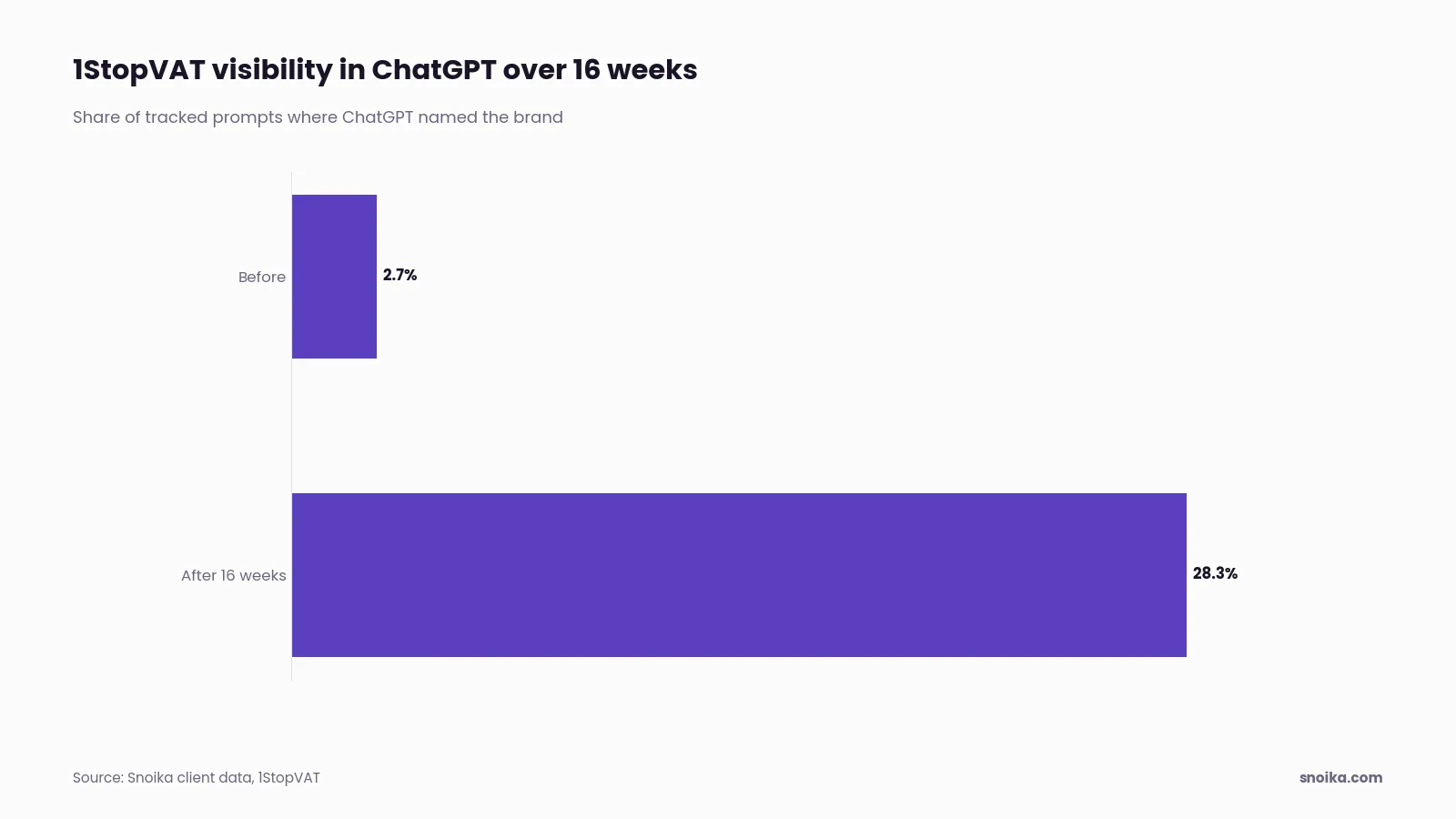
A mention is any answer that names your brand. Visibility rate is the share of prompts in your set where that happens, and it's the headline number most teams report. Snoika's founder Anton Vedeshin reported to Startup Reporter 1StopVAT's move from 2.7% to 28.3% ChatGPT visibility in 16 weeks. For a tax and fintech company, that meant going from absent in almost every relevant answer to present in more than 1 in 4.
Treat visibility as a rate across repeated runs, never as a rank. SparkToro, the audience research company, ran the same brand-recommendation prompts dozens of times per platform and found that ChatGPT and Google's AI returned the same brand list in fewer than 1 in 100 runs. The researchers wrote that treating these tools as sources of consistency "is provably nonsensical." But they also found that how often a brand appears across a large number of runs holds steady enough to track.
Citations
A citation is a linked source inside the answer. Citations and mentions differ because an assistant can name you without linking, or link your page while it recommends a competitor. Citations are the only part of an answer that can send a visitor. They rarely do, though. Pew Research Center tracked the browsing of 900 US adults and found that users clicked a link inside an AI summary in just 1% of visits. So count citations as exposure and proof of authority first. Their role as a traffic source comes second.
Share of voice
Share of voice is your mentions divided by all brand mentions across your prompt set. It puts a 20% visibility rate in competitive context, because that rate means one thing where rivals sit at 60% and another where they sit at 5%. The number depends on which competitors you define, so fix that list at the start. If you add a rival halfway through a quarter, your share drops overnight without anything having changed in the answers.
Sentiment
Sentiment records whether the answer describes you positively or negatively, with neutral descriptions between the two. Read the answer text as well as the score. Factual problems are the costliest because an assistant that quotes last year's pricing or credits you with a feature you've retired will hurt you in sales calls you never hear about.
AI visibility trackers
An AI visibility tracker sends a fixed set of prompts to AI assistants on a schedule and records each answer. Then it counts where your brand and your competitors appear. It's the only source on this page that looks inside the answer itself. That's why most stacks start here.
The prompt set decides the quality of everything downstream. Good prompts are written in the words buyers use, and they cover category questions ("best VAT compliance software for marketplaces") as well as comparisons between named options. Branded prompts reveal how assistants describe you, while unbranded prompts show whether you get recommended at all, the number that matters for most companies. Because answers vary from run to run, the tracker has to repeat each prompt until it produces a stable rate.
LLM SEO tools differ on prompt volume and the platforms they monitor. Their run schedules also vary. They also differ on what happens after the report. Our own tracking uses weekly prompt monitoring in ChatGPT and Google AI Overviews, where most AI search traffic happens. We measure mentions and share of voice, along with sentiment and citations. Our plans range from 10 prompts tested weekly on 1 AI platform in the free trial to 500+ prompts across all AI platforms on Growth. Volume matters because 10 prompts can confirm you exist in answers, but it takes hundreds to see movement by topic.
Movement is the point of tracking. Vespia, a fintech SaaS company, recorded a 220% increase in AI brand mentions, and a tracker is how a change like that becomes visible week by week. Before you buy AI SEO tools, check whether you can export raw answer text. Can you edit the prompt set yourself? And does the tool separate mentions from citations? A dashboard that blends the two hides the difference between being recommended and being used as a source.
Search Console for AI
Search Console shows how often Google displays your pages inside AI Overviews and AI Mode, but it reports impressions only. Google introduced the generative AI performance reports in June 2026 as a separate view in the Performance section. The report lists one metric, impressions, which you can split by page or country. Device and date splits are also available. These impressions also stay inside your overall performance report, so the new view is a filter on data you already had.
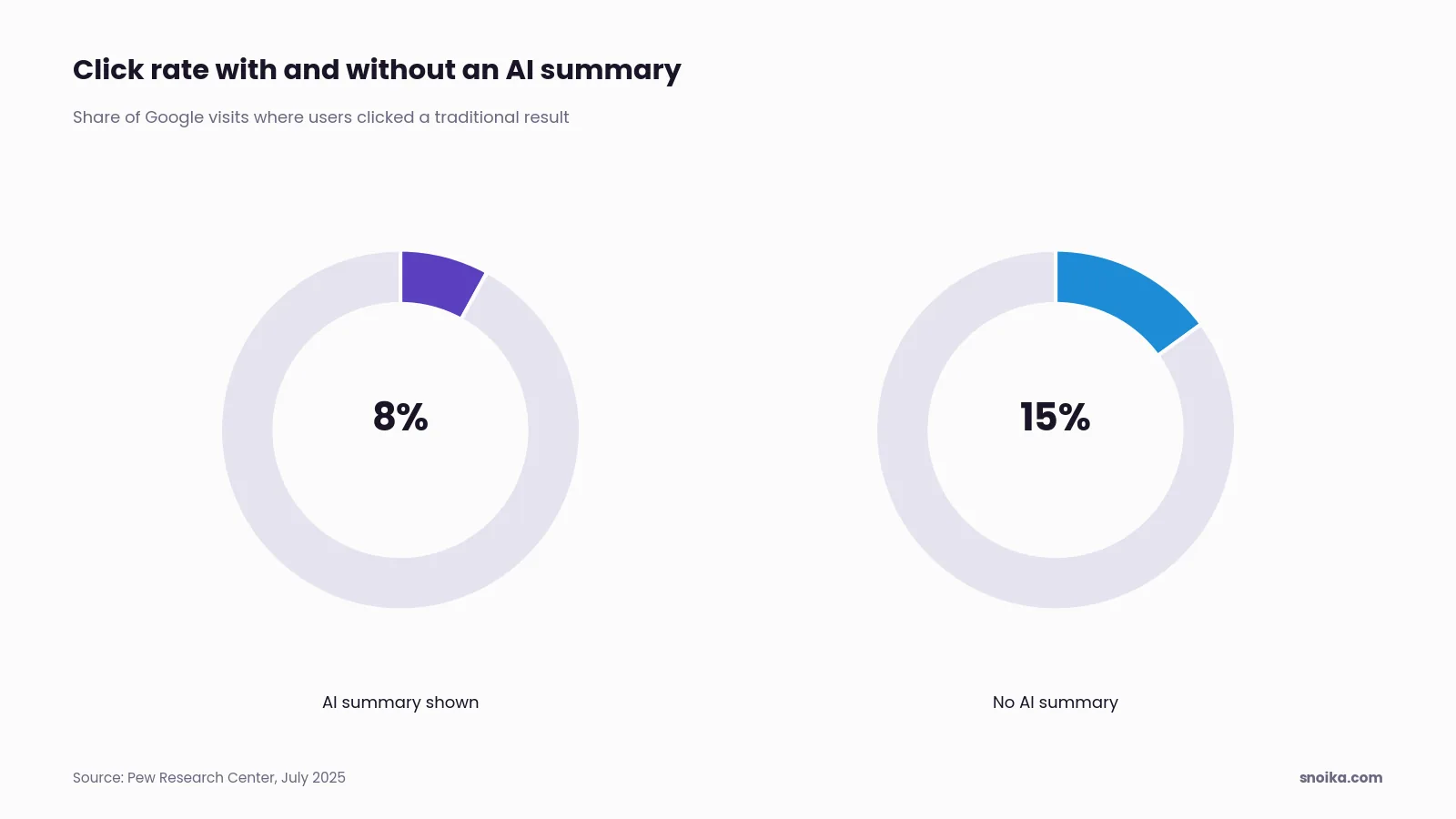
The report is missing clicks, and that matters for how you read it. Clicks from AI Overviews still sit inside your regular web search totals with no way to separate them. Pew Research Center found that users who saw an AI summary clicked a traditional result in 8% of visits, against 15% for users who didn't see one. A page can gain AI impressions while its clicks fall, and both numbers tell the truth.
Use the page dimension first. It shows which URLs Google trusts enough to quote, and those pages tell you what format and depth earn a place in AI answers on your topics. Agrello, an e-signature company, "generated 51.8K impressions from Snoika-created pages" and saw +125.6% organic search sessions year over year (YoY). Page-level data like this lets you credit specific content.
AI Overview coverage varies by market and favors longer, question-style searches, so a site built on short product keywords will see fewer AI impressions than one that answers questions. Check the country split before you compare yourself with a competitor in another region. Then put AI impressions for your top 20 pages next to their organic landing sessions in GA4, month over month.
GA4 signals worth tracking
In GA4, track AI referral sessions as their own channel. Then track the landing pages and key events those sessions produce. By default, GA4 files most AI visits under Referral, mixed in with partner sites and directories, so you can't see the channel until you separate it. OpenAI states that ChatGPT automatically includes utm_source=chatgpt.com in referral URLs, so those visits arrive labeled.
The channel needs a one-time setup.
- In GA4, open Admin and select Data display. Open Channel groups and copy the default channel group.
- Add a channel named "AI assistants". Set its Session source condition to match the regex `chatgpt\.com|perplexity\.ai|gemini\.google\.com|copilot\.microsoft\.com|claude\.ai`.
- Drag the new channel above Referral, because GA4 assigns each session to the first channel whose rule it matches.
- Mark the actions that signal intent as key events, such as demo requests or account signups.
- Build an exploration for the AI assistants channel that breaks out landing page and key events. Save it as your monthly view.
Review the channel's signals each month.
- Sessions by AI source, which shows which assistant sends you visitors and how that mix changes
- Landing pages for AI sessions, which shows the pages assistants cite and link
- Engagement rate and average engagement time compared with organic search
- Key event rate per AI source
- Direct sessions that land on deep pages, which can point to AI visits that lost their referrer
Key events are where AI traffic proves its worth. 3DOS reached top visibility in ChatGPT for targeted industry queries and recorded 2x registered users growth. Registration is the kind of key event GA4 can tie to a source, which turns a visibility gain into a business result you can defend.
Clicks from Google AI Overviews arrive as google / organic, so GA4 can't separate them from regular search clicks. Visits from mobile apps reach you with no referrer at all, which puts them in Direct. Watch direct traffic to deep content pages as a proxy. Nobody types a 9-word blog URL from memory.
CRM revenue attribution
To attribute revenue to AI search, record the visit source on the lead at the moment someone converts, then add what the buyer tells you about how they found you. GA4's session-source data stops at the handoff to sales, while the CRM records deal value without the session data. Pass the source across at the form to connect GA4 with CRM data in five steps.
- In Google Tag Manager (GTM), store the UTM source and referrer in a first-party cookie when a visitor lands, so the first source survives a return visit.
- Write those values into hidden fields on every lead form.
- Map the hidden fields to lead properties in your CRM, such as "original source" and "original source detail."
- Add a "How did you hear about us?" field with AI assistants as named options, and ask sales to log AI mentions from discovery calls in the same property.
- Send the GA4 client ID with the form, so you can later push closed deals back to GA4 as events through the Measurement Protocol.
Once the fields are flowing, report two numbers side by side. Tracked AI pipeline measures revenue from leads with an AI assistant as their recorded source, while self-reported AI pipeline uses the buyer's statement that an assistant led them to you. The two overlap, so don't add them together. The gap between them is your estimate of AI influence that no click captured, and in long B2B cycles that gap is the larger number.
A CRM is also where steady results become visible. 3DPrinterOS achieved #1 visibility in ChatGPT for industry-specific queries and turned AI search into a steady source of 3–4 qualified inbound leads/day. A number like "qualified leads per day" only exists when the source sits on the lead record. Without it, you'd have more traffic and no proof of what it bought.
First-touch attribution credits AI for the leads it started, while last-touch credits the source immediately before the form, such as a branded search. For AI search, first-touch plus the self-reported field gives the fairest picture, because the assistant opens the journey. Check monthly that the hidden fields aren't blank. A form change by another team can break attribution quietly for weeks.
What each source misses
Every source in the stack has a blind spot, and you can predict where each one sits. Knowing them stops you from reading a gap in one tool as a change in the market.
- Visibility trackers test prompts you chose. They don't see real prompt volume or the personalization that changes answers for a logged-in user.
- Search Console covers Google only and reports impressions without clicks or queries, so it can't tell you which question surfaced your page.
- GA4 merges AI Overview clicks into organic search and drops visits that arrive without a referrer into Direct. It also stops at the form.
- The CRM knows only what the form captured, and self-reported answers rely on memory, which blurs timing.
A rise in both tracker visibility and Search Console impressions alongside flat GA4 sessions means you're gaining exposure in answers people read without clicking. That isn't failure. Look for lifts in branded search and direct traffic over the next month or two. If GA4 AI sessions rise while tracker visibility holds steady, assistants are probably citing a page you didn't track, and the fix is to add prompts that match it.
Building your measurement stack
Build visibility tracking first to follow the flow of data. Add Search Console and GA4 before you set up the CRM fields. Each layer needs the one before it to make sense. What you choose for the tracking layer, and who acts on the findings, depends on the people and budget you have.
| Option | What you get | Effort for your team | Cost (2026) | Suits |
|---|---|---|---|---|
| Free tools plus manual checks | Search Console, GA4 and CRM fields, with prompts tested by hand | High: someone runs prompts and logs answers weekly | Plans on the pricing page | A first test before you commit budget |
| Monitoring-only tool | Dashboards of mentions and citations across a prompt set | Low for tracking, high for action, since your team writes the fixes | Subscription, varies by prompt volume | Teams with writers and SEO staff already in place |
| In-house team | Full control of prompts, content and reporting | High: hiring and tooling | Salaries plus tools | Large brands with steady content output |
| Agency | Strategy, reporting and often content | Medium: briefing and review | Monthly retainer, varies | Teams that want to hand off the work |
| Snoika | Visibility tracking, content maps, content creation and publishing, run by the same team with human review on top of automated workflows | Low: onboarding plus page approval | Plans on the pricing page | Teams that want measurement and content production in one place |
Free tools plus manual checks
- What you get
- Search Console, GA4 and CRM fields, with prompts tested by hand
- Effort for your team
- High: someone runs prompts and logs answers weekly
- Cost (2026)
- Plans on the pricing page
- Suits
- A first test before you commit budget
Monitoring-only tool
- What you get
- Dashboards of mentions and citations across a prompt set
- Effort for your team
- Low for tracking, high for action, since your team writes the fixes
- Cost (2026)
- Subscription, varies by prompt volume
- Suits
- Teams with writers and SEO staff already in place
In-house team
- What you get
- Full control of prompts, content and reporting
- Effort for your team
- High: hiring and tooling
- Cost (2026)
- Salaries plus tools
- Suits
- Large brands with steady content output
Agency
- What you get
- Strategy, reporting and often content
- Effort for your team
- Medium: briefing and review
- Cost (2026)
- Monthly retainer, varies
- Suits
- Teams that want to hand off the work
Snoika
- What you get
- Visibility tracking, content maps, content creation and publishing, run by the same team with human review on top of automated workflows
- Effort for your team
- Low: onboarding plus page approval
- Cost (2026)
- Plans on the pricing page
- Suits
- Teams that want measurement and content production in one place
During onboarding, we learn about your category and buyers, then discuss your goals. We ask for GA4 and Google Search Console access. We also need Google Tag Manager access, plus CMS access when we'll publish pages. Those three accounts are the base layers of any stack in this guide, so collect them whichever option you choose.
If you only need to know whether you show up, free tools and manual checks will tell you within a month. A monitoring-only tool fits when you already have people who can act on what it finds. When the numbers need to move and you lack the writers, pick an option that ties measurement to content. A dashboard can't fix the gaps it shows you.
Acting on AI search data
Act on AI search data by turning every prompt where a competitor gets cited and you don't into a page brief. Unbranded prompts with no mention are your backlog. The sources the assistant cites instead show what kind of page it trusts for that question.
Repeat this process monthly.
- Export prompts from your tracker where you're absent but a competitor is mentioned.
- Open the cited sources for each one and note their format and depth. Record the facts they state as well.
- Write or update one page per prompt cluster, with the direct answer in its opening paragraph.
- Publish, then check AI impressions in Search Console and AI sessions in GA4 for that URL after 4 weeks.
- Record any leads from those pages in the CRM, so the next month's priorities follow revenue.
Publishing speed decides how fast this loop turns. We use a DNS connection to publish on the client's own domain. It works on any CMS without a migration. The client approves each page in the dashboard before it goes live. Early gains show up in search data first. ABS Technologies got 6x SERP impressions and improved keyword indexability. Its search visibility was up significantly in the first 30 days.
Because assistants answer in the language of the prompt, a brand's presence in English answers can fail to carry over to German or Spanish answers. We create content in 135+ languages and regional variants for that reason. Run your prompt set in every language you sell in before you assume your visibility carries over. And keep the prompt set fixed during a test. Changing prompts mid-quarter breaks the trend line you're trying to read.
Next steps
Before you change any content, record one month of visibility rate per prompt cluster as your baseline. Pair it with your GA4 AI channel data and a populated CRM source field. Without it, you can't show later what moved, and AI search analytics turns into anecdotes. Lock the prompt set and competitor list for the first quarter, because both shift your numbers more than any single page will. We audit sites and track brand visibility in Google and AI assistants. We then create the content that closes the gaps we find. Get a [free AI visibility report](https
FAQ
Visibility trackers show mentions and citations, while Search Console shows Google AI impressions. GA4 records identifiable AI referral visits, and CRM data connects captured sources to deals. Match landing pages and date ranges when comparing these sources.
Pass visit-source information into your CRM through lead forms. Store the initial UTM source and referrer in a first-party cookie, then map hidden form fields to CRM source properties. Include the GA4 client ID so closed deals can later be sent back as events.
Track AI referral sessions and their key events in a separate channel placed above Referral. Compare landing-page performance and engagement with organic search each month. GA4 can't separate AI Overview clicks from regular Google organic traffic, and visits without referrers appear as Direct.
Use recorded AI sources on CRM leads to connect closed-deal revenue to AI referrals. Report buyer-reported AI influence separately because the two groups overlap and shouldn't be added together. First-touch attribution preserves credit when an AI referral starts a journey that ends through another channel.
Paid monitoring costs depend on prompt volume and platform coverage. Content work adds separate staffing or support costs.


