
Technical SEO guide for marketing teams
Technical SEO is the work that lets search engines and AI assistants reach your pages and understand them, so the content on those pages can rank or get cited. This technical SEO guide follows the crawler's path through your site and explains how that affects the answer an assistant writes. Content and links only start to pay off once this layer works.
 Artem LozinskyOperations and product, Snoika · 15 min read

























Technical SEO for marketing teams
For a marketing team, technical SEO covers the site conditions that decide whether the content budget produces any traffic. A post that Googlebot can't fetch earns nothing, however good it is. The same goes for a product page that carries a stray noindex tag left over from staging. Marketers rarely write the code that fixes these problems. They own the pipeline and the targets, though, so they need to know what to ask developers for and how to check that it's done.
Technical SEO basics come down to two questions about every page that matters. Can a machine get the page? And once it has the page, can it understand what the page is about? A machine must crawl a page before it can index it, and rendering determines what content it can access. Architecture and structured data help it understand that content. Page speed affects both, because slow servers get crawled less and slow pages lose visitors.
A 60-page B2B site on WordPress has different technical SEO risks from a 40,000-page documentation hub built on a JavaScript framework. The small site fails on basics such as missing sitemaps or duplicate URLs. The large site fails on scale. So a sound technical SEO strategy starts with your revenue pages and asks what blocks them, before anyone runs a generic checklist of 200 warnings.
Start by opening the Page indexing report in Google Search Console. Then compare the number of indexed pages with the number of pages you actually want in search. If the gap is wide in either direction, you've found where the work begins.
Crawling explained
Crawling is the step where a bot requests a URL and downloads whatever your server sends back. Googlebot finds URLs in two main ways: links from pages it already knows, and the XML sitemap you submit. If neither points to a page, the crawler has no route to it, and that page doesn't exist as far as search is concerned.
Your robots.txt file tells crawlers which paths they may request. It's a blunt tool. One wrong line, such as `Disallow: /` copied from a staging server, can block an entire domain overnight. The server's response matters as much as the rules. A 200 status code means the page is fine. A 301 means it moved permanently, and a 404 means it's gone. Repeated 5xx errors tell Google to slow down and come back later.
Crawl budget gets a lot of attention, but most marketing sites never hit it. Google says its crawl budget guide is meant for sites with 1 million+ pages whose content changes about weekly, or sites with 10,000+ pages that change daily. For a B2B site with 500 pages, discovery is the main concern. The pages that go uncrawled are the ones nothing links to.
Crawl blockers on marketing sites include:
- a robots.txt rule that blocks a folder with live content, often `/blog/` or `/resources/`
- an XML sitemap that lists redirected or broken URLs, which teaches Google to trust it less; noindexed URLs in the sitemap have the same effect
- orphan pages that sit in the CMS with no internal link pointing to them
- faceted filters and tracking parameters that create thousands of near-identical URLs
- links that exist only as JavaScript click handlers instead of `<a href>` elements
To check crawling in SEO, run a crawler over your site and compare its URL list with your sitemap and your analytics landing pages. If you can get server logs, read them. Logs show which URLs Googlebot actually requested, which tells you more than any tool's guess.
Indexing explained
Indexing is the search engine's decision to store a page it has crawled and keep it as a candidate for results. A crawled page isn't automatically indexed. Google drops pages that it reads as duplicates or that look thin. It also drops pages that ask to be left out.
A `noindex` meta tag or HTTP header tells Google not to store the page at all. A canonical tag works differently. It names the preferred version of a set of similar URLs, and Google treats it as a strong hint, though Google doesn't always follow the user-selected canonical. Problems start when the signals contradict each other. A page listed in the sitemap and linked from the main navigation sends three different instructions if it is also canonicalized to another URL. Google picks one.
In Search Console, "Crawled - currently not indexed" means Google saw the page and judged it not worth storing, which points to thin or duplicate content. "Discovered - currently not indexed" means Google knows the URL exists but hasn't fetched it yet, which points to weak internal linking or a slow server. Each label leads to a different fix, so read the label before you change anything.
Fixing indexability shows up quickly in the data. ABS Technologies, one of Snoika's clients, recorded 6x SERP impressions after its indexing problems were cleared, along with "improved keyword indexability and significantly increased search visibility within the first 30 days." Pages that had been invisible became eligible to appear, so impressions rose before rankings had time to move.
Use the URL Inspection tool in Search Console on your 20 most valuable pages. It shows whether each page is indexed and which canonical Google chose. It also shows when Googlebot last crawled the page.
How rendering affects rankings
Rendering is the step where a crawler runs a page's JavaScript to build the version a browser would show. Content that appears only after that step depends entirely on the crawler doing the work. Googlebot does it, though it adds a stage. After a page gets crawled as raw HTML, it waits in a queue for the rendering service. Google sees the content that scripts inject only after rendering.
Google has worked to shrink that gap. Martin Splitt, a Developer Advocate at Google, put it this way in 2020: "as a developer or SEO I would just assume my pages get rendered and get on with it." For Google Search, that advice mostly holds. Rendering failures still happen when scripts time out or an API call fails for the bot. A script blocked in robots.txt also causes a failure if it is needed to draw the content.
A 2024 server-log study by Vercel and MERJ found that none of the major AI crawlers execute JavaScript. The SearchOptimo summary of the study reports that GPTBot fetched JavaScript files in about 11.5% of its requests but never ran them. Google's Gemini is the main exception, because it uses Googlebot's rendering infrastructure. So in JavaScript SEO, a single-page app that ranks well in Google can still be blank to ChatGPT.
Server-side rendering and static generation send finished HTML on the first request, which every crawler can read. Client-side rendering sends an empty shell and builds the page in the browser. That works for logged-in app screens and fails for marketing pages. Hybrid frameworks let you render the public pages on the server and keep the app on the client.
To test a page, open it with JavaScript turned off or fetch it with `curl`. Check the resulting HTML for your main heading and your first paragraph. If those words aren't in the raw HTML, AI crawlers can't see them.
Site architecture that scales
A site architecture that scales keeps every important page within 3 or 4 clicks of the home page and groups pages into folders that match how buyers think about your topics. New pages then slot into an existing section instead of floating loose. Internal links carry most of that structure. John Mueller, Search Advocate at Google, said in March 2022 that internal linking is "one of the biggest things you can do on a website to kind of guide Google and guide visitors to the pages that you think are important."
URLs should be short and readable, and they should stay stable after publication. A descriptive URL such as `/guides/technical-seo/` tells both a person and a crawler where they are, while `/p?id=4471` leaves that location unclear. Every time a URL changes, you need a 301 redirect, and redirect chains slow crawlers down and leak the value of old links. Settle the folder plan before you publish at volume, because restructuring 800 pages later is a website migration project.
Subfolders beat subdomains for content. A blog on `blog.example.com` is treated much like a separate site, so it builds authority apart from the main domain. A blog at `example.com/blog/` shares it. That's why Snoika publishes client content on the client's own domain. It connects through DNS, so no migration is needed, and it works on any CMS. Keep the content where the domain's authority already lives.
International sites add hreflang tags, which tell Google which language or regional version to show to which searcher. The tags have to point both ways and use correct language codes. They also have to point at indexable URLs. Errors multiply with each language you add, and a team publishing in a dozen regional variants can produce thousands of broken references from one template mistake. The scale is even larger for Snoika, which creates content in 135+ languages and regional variants, so an hreflang error there would repeat across every one of them.
Check click depth in your crawler, and list every orphan page it finds. Then look at the internal links pointing to your top 10 commercial pages. If a pricing or solution page has fewer internal links than an old press release, the architecture is pointing Google at the wrong pages.
Core Web Vitals for growth
Core Web Vitals are Google's field metrics for how a page feels to real visitors. Google uses data from Chrome users to measure each one at the 75th percentile of real visits, so a fast developer laptop proves nothing. Google's web.dev documentation sets the thresholds below.
| Metric | What it measures | Good | Poor |
|---|---|---|---|
| Largest Contentful Paint (LCP) | Time until the largest visible element loads | 2.5 seconds or less | Over 4 seconds |
| Interaction to Next Paint (INP) | Delay between a click or tap and the visible response | 200 milliseconds or less | Over 500 milliseconds |
| Cumulative Layout Shift (CLS) | How much the layout jumps while loading | 0.1 or less | Over 0.25 |
Largest Contentful Paint (LCP)
- What it measures
- Time until the largest visible element loads
- Poor
- Over 4 seconds
Interaction to Next Paint (INP)
- What it measures
- Delay between a click or tap and the visible response
- Good
- 200 milliseconds or less
- Poor
- Over 500 milliseconds
Cumulative Layout Shift (CLS)
- What it measures
- How much the layout jumps while loading
- Good
- 0.1 or less
- Poor
- Over 0.25
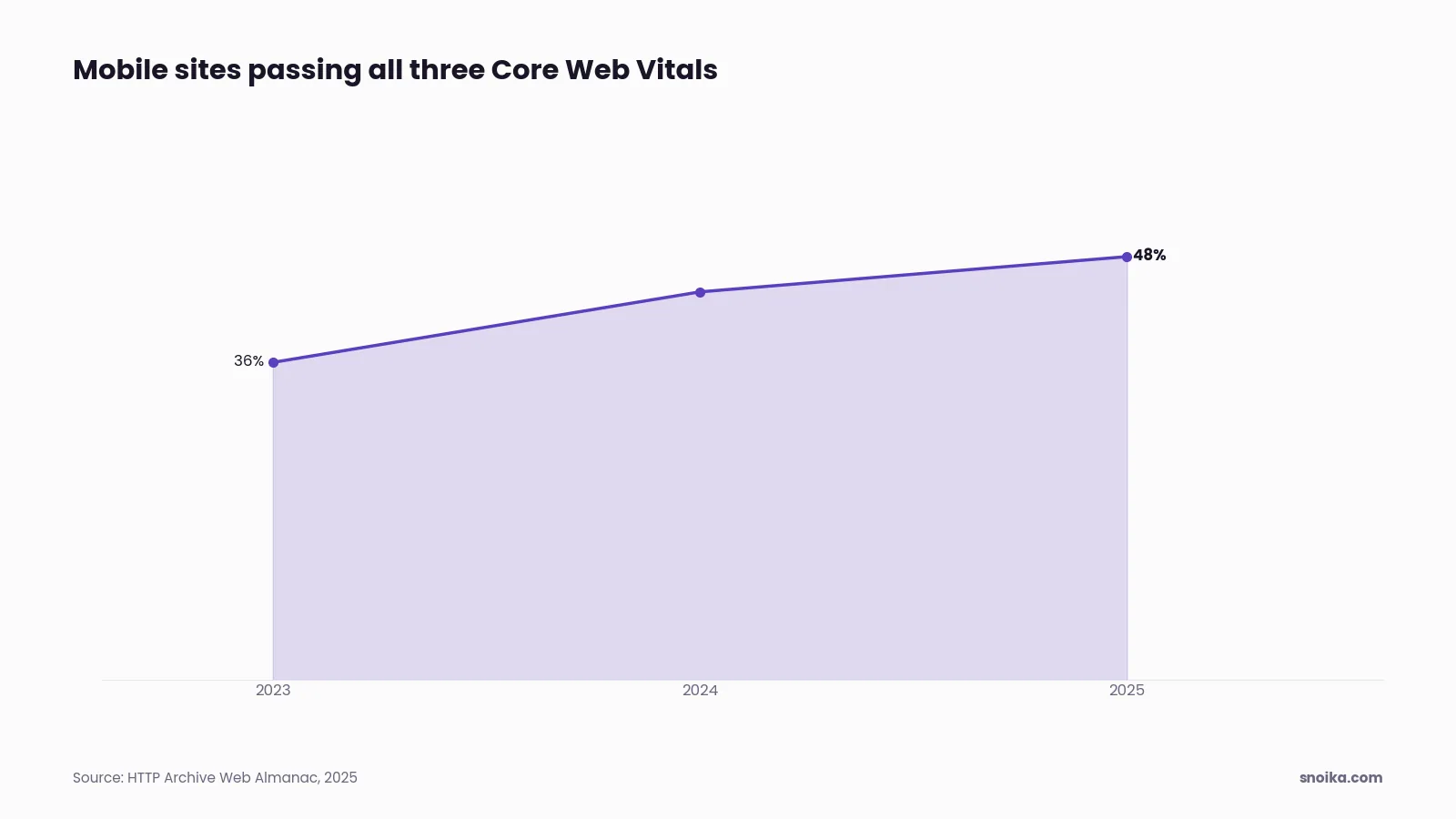
Most sites still miss at least one threshold on mobile. The HTTP Archive's 2025 Web Almanac found that 48% of mobile websites passed all three metrics. The pass rate rose from 36% in 2023 to 44% in 2024 before that. LCP has the most failures. A heavy hero image or a slow server response can cause an LCP failure. Render-blocking scripts that load before the content are another cause.
Core Web Vitals are a ranking signal, but a light one. Relevance beats them every time, and a fast page with weak content won't outrank a slower page that answers the query. A Deloitte and Google study of 37 brands, "Milliseconds Make Millions," makes a stronger commercial case: it found that a 0.1-second mobile speed improvement went with 8.4% more retail transactions. B2B funnels have the same weak spot on a demo form that takes 6 seconds to respond.
Read the Core Web Vitals report in Search Console first, because it shows field data grouped by URL pattern. Lighthouse and PageSpeed Insights lab scores help diagnose a cause, but they don't decide whether you pass. Fix templates. One slow blog template can drag down every article built on it.
Structured data drives SERP features
Structured data is code written in JSON-LD that labels a page's content, such as an article or an organization. On a product page, it can label the product and its price. It makes a page eligible for rich results, the enhanced listings with stars or breadcrumbs that take up more space on the results page.
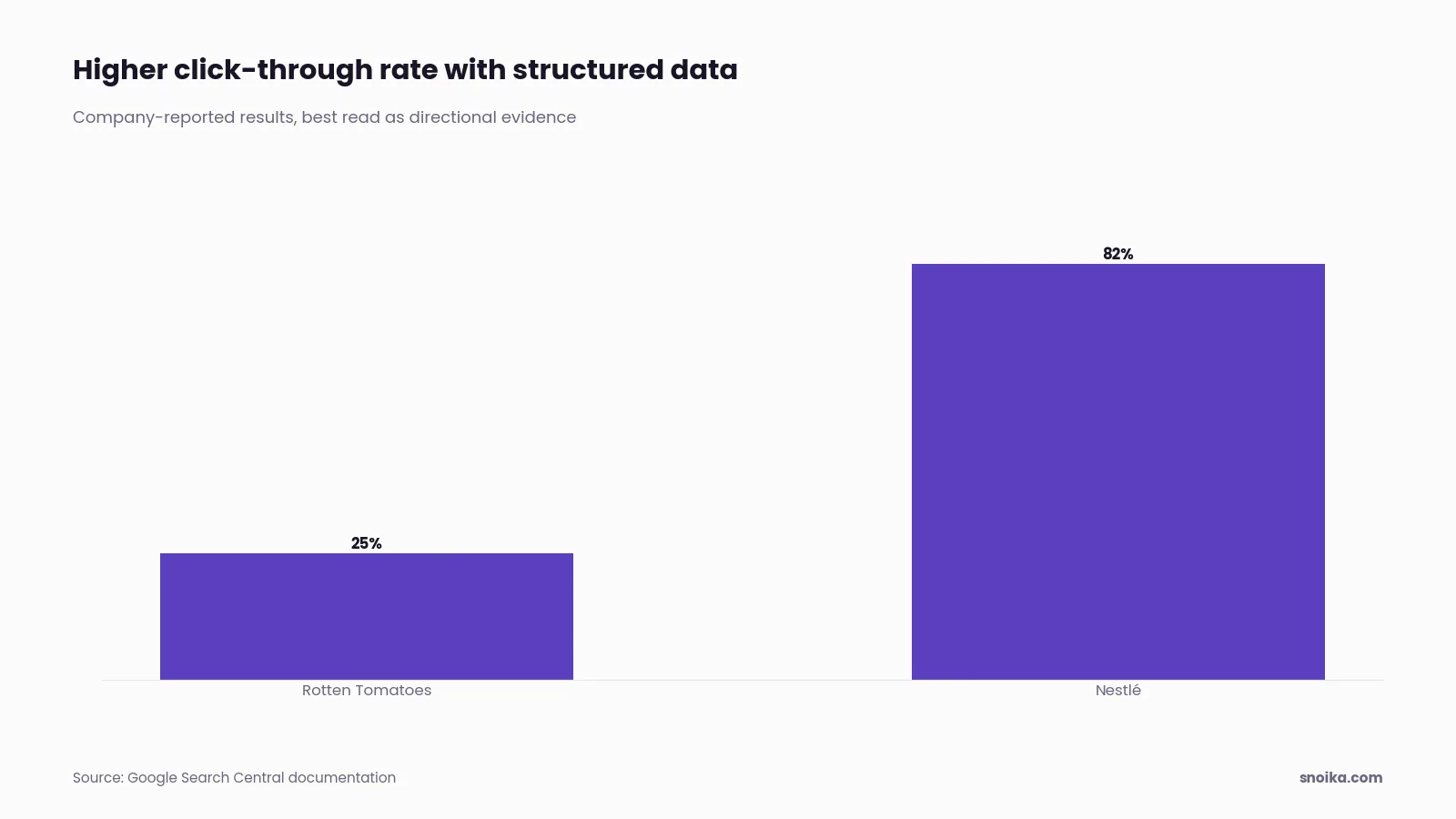
Those richer SERP features earn more clicks at the same position. Google's own documentation reports that Rotten Tomatoes measured a 25% higher click-through rate on 100,000 pages enhanced with structured data, compared with pages without it. Nestlé reported an 82% higher click-through rate for pages that appeared as rich results. Both figures come from companies that chose to publish them, so treat them as directional evidence.
For B2B sites, Organization markup on the home page connects the brand name to the logo and official profiles. Article markup covers blog posts and guides, and BreadcrumbList shows the folder path in the result. Product or SoftwareApplication markup suits pricing and product pages. Mark up only what is visible on the page. Google treats markup that describes hidden content as spam.
Structured data matters less for AI assistants than vendors claim. Ahrefs tracked 1,885 pages in 2025 and 2026 and found that adding JSON-LD produced no lift in AI citations, as reported by Machina. In that dataset, Google AI Overviews citations fell 4.6%, and the changes for ChatGPT stayed within statistical noise. Add schema for rich results in Google and don't expect it to win you citations.
Validate every template with a structured data checker such as Google's Rich Results Test, then watch the Enhancements reports in Search Console for errors after each release. A theme update can quietly strip markup from 500 pages at once.
Technical SEO in AI search
AI models cite pages they can fetch and parse, so most of the technical work for AI search is the same work you do for Google. Google requires a page to be indexed and eligible for a snippet to appear as a supporting link in AI Overviews or AI Mode, and says "there are no additional technical requirements." Google's AI optimization guide adds that it doesn't use llms.txt files or special AI markup.
ChatGPT and other assistants outside Google run their own crawlers with their own rules, and that's where new failures appear. These technical issues stop AI assistants from citing a page:
- a robots.txt rule or firewall setting that blocks the AI search crawler, often added by a security team to stop model training
- main content that only appears after JavaScript runs, which non-Google AI crawlers never execute
- a `noindex` or `nosnippet` directive, which removes the page from Google's AI features along with regular snippets
- key facts locked inside images or PDFs without a text layer; facts in tabs that load on click are also inaccessible
- pages that never got indexed in the first place, because AI Overviews draw from Google's index
OpenAI runs separate crawlers for model training and for search, so an accidental robots.txt block is easy to create. Its documentation states that sites opted out of OAI-SearchBot "will not be shown" in ChatGPT search answers. A team that blocks every OpenAI user agent to keep its content out of training data also takes itself out of ChatGPT search. Decide on each bot separately.
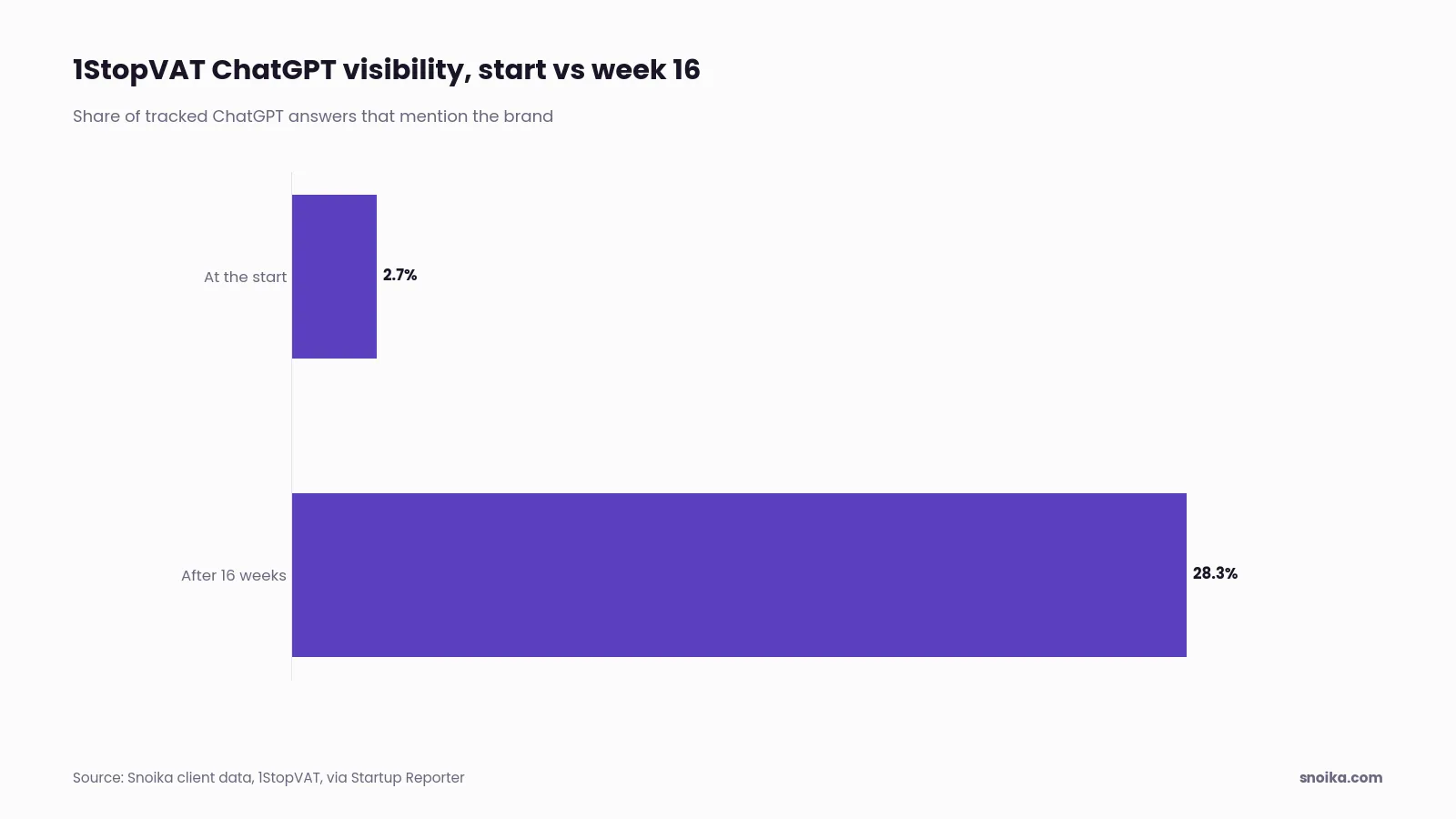
Measuring AI visibility takes a different method from rank tracking, because assistants have no fixed results page to check. The usual approach is to run a fixed set of buyer prompts every week and record whether your brand is mentioned or cited. Snoika's tracking uses this method to measure mentions and share of voice. It also records sentiment and citations. It runs in ChatGPT and Google AI Overviews, where most AI search traffic happens. Repeated over time, those prompt sets show change. Snoika's founder Anton Vedeshin reported to Startup Reporter 1StopVAT's move from 2.7% to 28.3% ChatGPT visibility in 16 weeks.
Begin the three AI access tests with a review of your robots.txt for named AI user agents, then ask whoever manages your content delivery network whether bot protection is on. Then fetch a key page without JavaScript and confirm the answer text is in the HTML.
Running a technical SEO audit
A technical SEO audit crawls your site the way a bot does and compares what it finds with what search engines have indexed. It then ranks the fixes by their effect on pages that bring in revenue. The output should be a short, ordered list of tickets a developer can pick up. A 90-page PDF of warnings is the wrong deliverable.
How to run the audit step by step
Run the audit in this order, because each step uses what the earlier step found:
- Get access to Google Search Console and Google Analytics 4 (GA4). You'll also need Google Tag Manager access, plus CMS access if fixes will be published directly. Snoika's onboarding asks for exactly this set, because it holds the field data a crawler can't see.
- List 20 to 50 priority URLs that drive demo requests or sign-ups. Include pages that drive sales.
- Crawl the whole site with a desktop crawler, once with JavaScript rendering on and once with it off, and save both exports.
- Compare the crawl with your XML sitemap and Search Console's Page indexing report to find missing or duplicated pages. Check for blocked pages in that comparison too.
- Inspect each priority page in Search Console's URL Inspection tool to confirm its index status and the canonical Google chose.
- Review the Core Web Vitals report by template and note which templates fail on mobile.
- Run a robots.txt checker and test the raw HTML of priority pages for AI crawler access.
- Score each issue by the number of priority pages it affects and the effort to fix it, then write tickets starting with the highest score.
- After fixes ship, request reindexing for the affected URLs and re-crawl after 2 to 4 weeks to confirm the change held.
What a B2B technical SEO checklist includes
A B2B checklist gives more weight to a few pages than an ecommerce checklist does, because a B2B site makes its money on a handful of solution and pricing pages. These are the technical SEO best practices to confirm on every B2B site:
- every priority page returns a 200 status and sits in the sitemap; each is indexed under its own canonical URL
- gated content has an indexable landing page that summarizes the asset in text
- staging and demo environments are noindexed or password-protected; the same protection applies to test environments
- old campaign pages and retired product URLs redirect in a single hop to their closest live match
- the blog and resources live in subfolders of the main domain; documentation lives there too
- forms and demo booking scripts don't block the main content from loading
- Organization and Article markup validate on their templates
- AI search crawlers are allowed in robots.txt and at the firewall
What real technical SEO fixes look like
Real technical SEO work is unglamorous and specific. One common example is a site relaunch that shipped with the staging robots.txt still in place, so search traffic dropped by half within two weeks. Removing one line and resubmitting the sitemap fixed it. Another, in SaaS technical SEO, is a company whose comparison pages rendered their tables in JavaScript, so ChatGPT never saw the comparisons. Moving that table into server-rendered HTML was a two-day job.
Consider a larger project with a documentation hub of 12,000 URLs, 70% of which are parameter variants. Canonical tags plus a parameter rule in the sitemap generator shrink the crawlable set to the pages that matter. A blog whose posts sit five clicks deep gets topic hub pages that link to each post, which cuts the depth to two. Each of these fixes made existing content reachable.
Technical SEO vs on-page SEO
Technical SEO makes a page reachable and readable by machines, while on-page SEO makes it relevant and useful for a specific search. The two overlap at the page level, which is why teams confuse them, but they answer different questions and belong to different people.
| Technical SEO | On-page SEO | |
|---|---|---|
| Question it answers | Can crawlers reach the page and process it? | Does the page match what the searcher wants? |
| Typical work | Robots.txt, sitemaps, canonicals, rendering, speed, structured data | Titles, headings, body copy, internal anchor text, images |
| Scope | Templates and the whole site | One page at a time |
| Usual owner | Developers with SEO direction | Content writers and editors |
| How you check it | Crawlers, server logs, Search Console reports | Rankings, click-through rate, engagement on the page |
| When it fails | The page never appears anywhere | The page appears but ranks low or doesn't get clicks |
Question it answers
- Technical SEO
- Can crawlers reach the page and process it?
- On-page SEO
- Does the page match what the searcher wants?
Typical work
- Technical SEO
- Robots.txt, sitemaps, canonicals, rendering, speed, structured data
- On-page SEO
- Titles, headings, body copy, internal anchor text, images
Scope
- Technical SEO
- Templates and the whole site
- On-page SEO
- One page at a time
Usual owner
- Technical SEO
- Developers with SEO direction
- On-page SEO
- Content writers and editors
How you check it
- Technical SEO
- Crawlers, server logs, Search Console reports
- On-page SEO
- Rankings, click-through rate, engagement on the page
When it fails
- Technical SEO
- The page never appears anywhere
- On-page SEO
- The page appears but ranks low or doesn't get clicks
The order matters more than the split. On-page work on a page that isn't indexed is wasted, so technical problems on priority pages come first. Once those pages are indexed and render cleanly, the gains come from on-page work and content. A clean technical audit leaves a site stalled if its pages are weak, while crawl problems prevent even strong pages from reaching anyone.
Next steps
This week, pick your 20 priority pages and check each one for 2 things: its index status in URL Inspection, and whether its main text appears in the raw HTML. That one pass catches the failures that cost the most in both Google and AI search, and it takes about an afternoon. Write down what you find in an SEO report template before anyone changes anything, so you can measure the effect of each fix. Then use this technical SEO guide as the checklist for the full audit.
We audit websites and track brand visibility in Google and AI assistants, with a human review on top of the automated checks. To go through your site's results with our team, book a call.
FAQ
Start with 20 to 50 priority pages and check their indexing. Follow this technical seo guide to compare crawls with search reports, then test page speed and AI access. Turn findings into prioritized developer tickets, and recheck affected pages 2 to 4 weeks after fixes.
A B2B checklist covers access and indexing for revenue pages. Check site structure and redirects, then verify loading performance and structured data. Include AI crawler permissions and safeguards for test environments, while ensuring gated assets have indexable landing pages.
Crawler blocks and content that requires JavaScript can prevent AI assistants from accessing your pages. Check whether firewall rules deny access or key facts lack readable text. For Google's AI features, pages also need to be indexed and eligible for snippets.
Examples include removing a staging rule that blocks live pages and moving comparison tables into server-rendered HTML. Verify the first fix by checking crawler access. Verify the second by confirming the comparison text appears in the HTML without JavaScript.
Re-crawl affected pages 2 to 4 weeks after fixes to confirm the changes held. Compare their indexing status with your saved baseline. That's a verification window rather than a ranking deadline, since making pages accessible doesn't guarantee rankings for their content.

