Agent readiness for landing pages
Agent readiness is how well an AI agent can understand an offer from a landing page and take the action the page was built for, with no human clicking for it. An agent-ready page serves its content in plain HTML and gives every button and form field a label. Its prices are written as text, and schema markup describes the offer. When those signals are missing, the agent guesses or moves on to a page it can read.
 Anton VedeshinFounder, Snoika · 9 min read

























Landing pages for agents
Your landing page now receives visits from people and software that reads the page for a person. Adobe's retail data shows that traffic from AI sources to US retail sites grew 393% year over year in the first quarter of 2026, and in March that traffic converted 42% better than non-AI traffic. A year earlier it had converted worse.
Crawlers collect pages for training and search indexes. Assistants built on large language models, such as ChatGPT, fetch a page while they answer a question. In agentic search, browser agents fill in forms on the pages they open and press the buttons. Gartner expects at least 15% of day-to-day work decisions to be made autonomously by agentic AI by 2028, up from 0% in 2024.
Adobe scored US retail product pages at 66% machine-readable, which means about a third of their content is invisible to large language models. So before you redesign anything, find out which of these visitors your page actually serves.
What agent readiness means
Agent readiness means a machine can read your page accurately and then act on it. Search optimization concerns a page's ranking, while agent readiness concerns software's ability to extract facts and complete a task once it reaches the page. A page can rank first on Google and still fail here, because Googlebot renders JavaScript and fills gaps that other agents leave empty.
On a lead-generation page, the agent needs an offer that identifies its intended buyer and a form it can submit. A software-as-a-service (SaaS) pricing page has to give it named plans with their prices and limits. An ecommerce page adds stock levels and delivery terms. Test whether an agent can answer the buyer's question from the page alone and then do the next step.
People who work on this call it the agent experience, or the agentic experience. Both names describe how plainly the page says what's on offer and how to get it. Check that against your own page by writing down the single action it exists for. If you can't name that action in a few words, an agent won't find it either.
Structural signals agents parse
The way to make a landing page readable by AI agents is to build it from semantic HTML, with labels that describe each element's job. Agents read a stripped-down map of the page. Chrome's Lighthouse documentation states that "Agents rely on the accessibility tree as their primary data model." The accessibility tree is the same structure screen readers use, built from your HTML roles and names along with each element's state.
For its ChatGPT agent in Atlas, OpenAI's publisher FAQ told site owners to follow WAI-ARIA best practices "by adding descriptive roles, labels, and states to interactive elements like buttons, menus, and forms." Agents use these landing-page elements to identify content and actions:
- One H1 that names the offer, then headings in order with no skipped levels
- Landmark elements such as `<main>`, `<nav>` and `<footer>` so the agent can find the content
- Real `<button>` and `<a href>` elements in place of clickable `<div>` tags
- A visible text name on every button, such as "Start free trial" rather than an icon
- Alt text on images that carry information, such as a chart or a plan comparison
The WebAIM Million report found empty buttons on 29.6% of the top 1,000,000 home pages in 2025. An agent can't press a button it can't name. To check your page, open the Accessibility pane in Chrome DevTools and read the names it shows for your main call to action.
Pricing clarity agents require
To present pricing for AI agents, write each price as HTML text with its currency and billing period. Put what's included next to that price. An agent quoting your price to a buyer needs all of those together. "€49" tells it little.
A price shown as an image is unreadable to most agents. A monthly/yearly toggle that loads the second price with JavaScript hides half your pricing from crawlers that don't run scripts. And "Contact us for pricing" on every tier gives the agent nothing to compare, so a competitor that publishes a number gets cited in your place.
"Enterprise custom pricing depends on seats and integrations and starts at 50 seats" gives an agent custom-pricing terms it can pass on.
Then check that every price on the page matches the price in your schema markup and on your checkout page. When the numbers conflict, an agent reports the wrong one or drops your offer.
Forms agents can use
An agent can trigger an action when the page contains a native HTML form with a labeled field for each input and a submit button whose text names the result. That structure tells the agent what each field expects and what pressing the button will do. Without it, the agent has to infer meaning from placeholder text or position, and it gets it wrong.
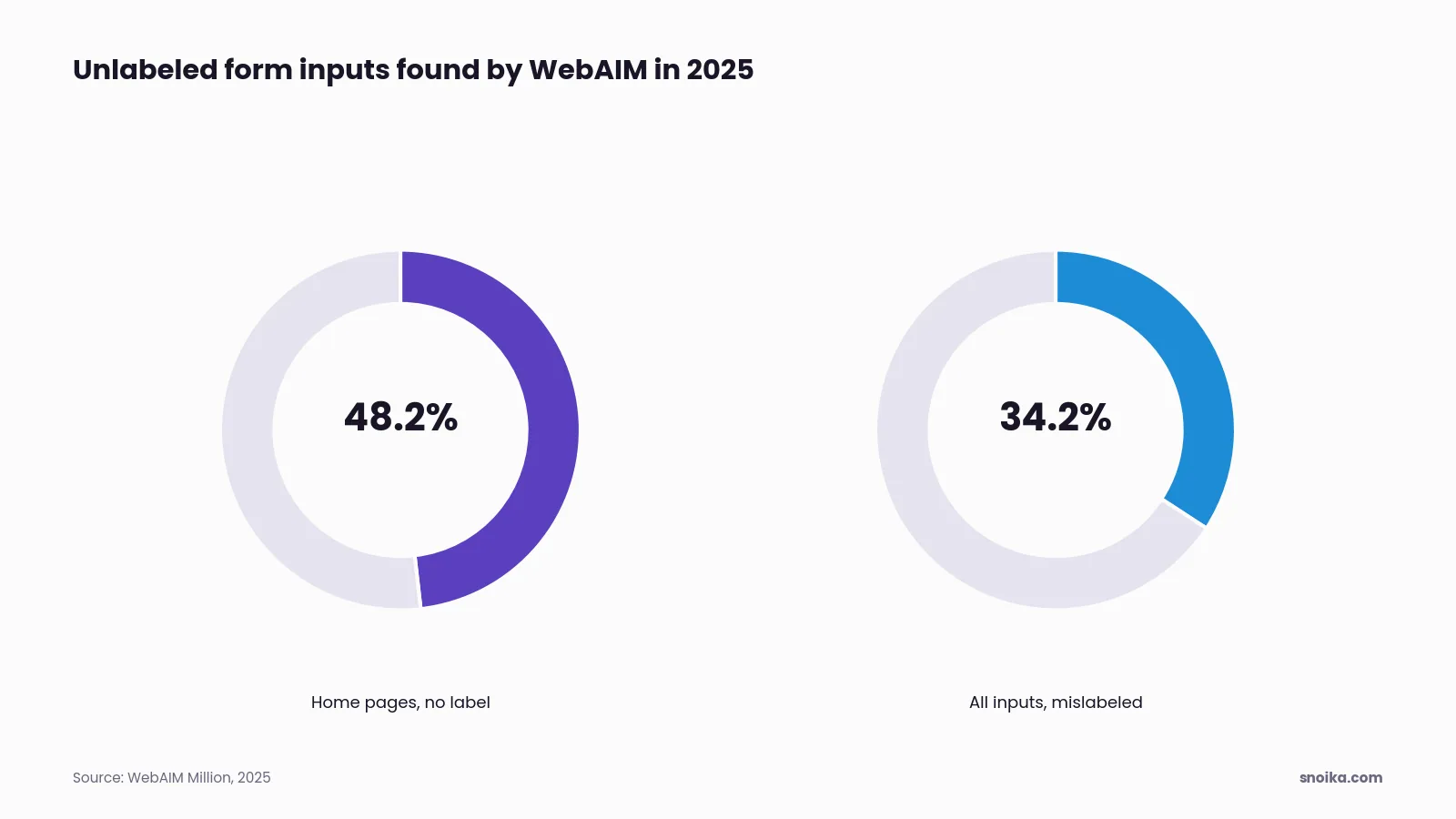
In WebAIM's 2025 scan, 48.2% of home pages had form inputs with no label, and 34.2% of all detected inputs weren't labeled correctly. A field marked only by greyed-out placeholder text loses its meaning the moment the agent types into it.
Start lead-form repairs with native HTML structure, then work through the controls to submission feedback:
- Wrap the fields in a `<form>` element that has a real `action` URL.
- Give each input a `<label>` linked by `for` and `id`. Add a `name` attribute to the input.
- Use the right input types, such as `email` or `tel`, so the agent knows the format. Use `number` for numeric input.
- Mark required fields with the `required` attribute.
- Write the button text as the outcome, such as "Request a demo".
- Show a confirmation message in the page text after submission, so the agent can tell it worked.
Chrome is testing a further step called WebMCP. You add `toolname` and `tooldescription` attributes to a form, and Lighthouse's forms audit flags forms that lack them. The audit is informational for now, and few agents call WebMCP tools today, so do the six steps above first. Keep in mind that a CAPTCHA on the first step stops agents too. Put bot protection where abuse actually happens.
Offer logic agents must resolve
Every condition attached to your offer has to be written as a plain rule an agent can apply. Buyers ask agents conditional questions. Is there a free trial? What happens when it ends? Does the discount apply to my country? If the answer lives in a tooltip or a modal, the agent can't resolve it and describes the offer wrongly. The same problem occurs when the answer is in the fine print of a PDF.
State each condition next to the offer it changes. "14-day free trial, no card required, then €29/month unless you cancel" settles three questions in one line. State who qualifies and the minimum order, then give the offer's end date.
A hero banner promising 30% off and a footer saying 20% create a damaging conflict because they leave the agent with two answers and no means of choosing. Pages for different markets cause the same problem when one page relies on a currency switcher the agent can't use. Snoika creates content in 135+ languages and regional variants, and each market needs one set of terms written on the page.
To check your own offer, read the page and list every "if" a buyer asks about. Give each one an answer in visible text.
Schema markup agents depend on
Schema markup gives agents a labeled copy of the facts on your page, in a format they don't have to interpret. Fabrice Canel, Principal Product Manager at Microsoft Bing, confirmed Microsoft's use of this markup at SMX Munich in March 2025 when he said that "Schema Markup helps Microsoft's LLMs understand content."
Choose schema.org types that match what the landing page offers and where it sits on the site:
| Schema type | Use it on | Properties agents read |
|---|---|---|
| Organization | Every page, once | name, url, logo, sameAs, contactPoint |
| Product or Service | The page selling it | name, description, brand, offers |
| Offer | Inside Product or Service | price, priceCurrency, availability, eligibleRegion, priceValidUntil |
| SoftwareApplication | SaaS landing pages | applicationCategory, operatingSystem, offers |
| BreadcrumbList | Pages below the home page | itemListElement, position, name |
Organization
- Use it on
- Every page, once
- Properties agents read
- name, url, logo, sameAs, contactPoint
Product or Service
- Use it on
- The page selling it
- Properties agents read
- name, description, brand, offers
Offer
- Use it on
- Inside Product or Service
- Properties agents read
- price, priceCurrency, availability, eligibleRegion, priceValidUntil
SoftwareApplication
- Use it on
- SaaS landing pages
- Properties agents read
- applicationCategory, operatingSystem, offers
BreadcrumbList
- Use it on
- Pages below the home page
- Properties agents read
- itemListElement, position, name
Put the markup in JSON-LD inside the server-rendered HTML. Don't inject it with a tag manager after the page loads. Every value must match what a visitor sees, because markup that says €39 on a page showing €49 is a conflict the agent has to settle on its own. Run each page through the Schema.org validator after every change to pricing or offer terms.
Keep key content crawlable
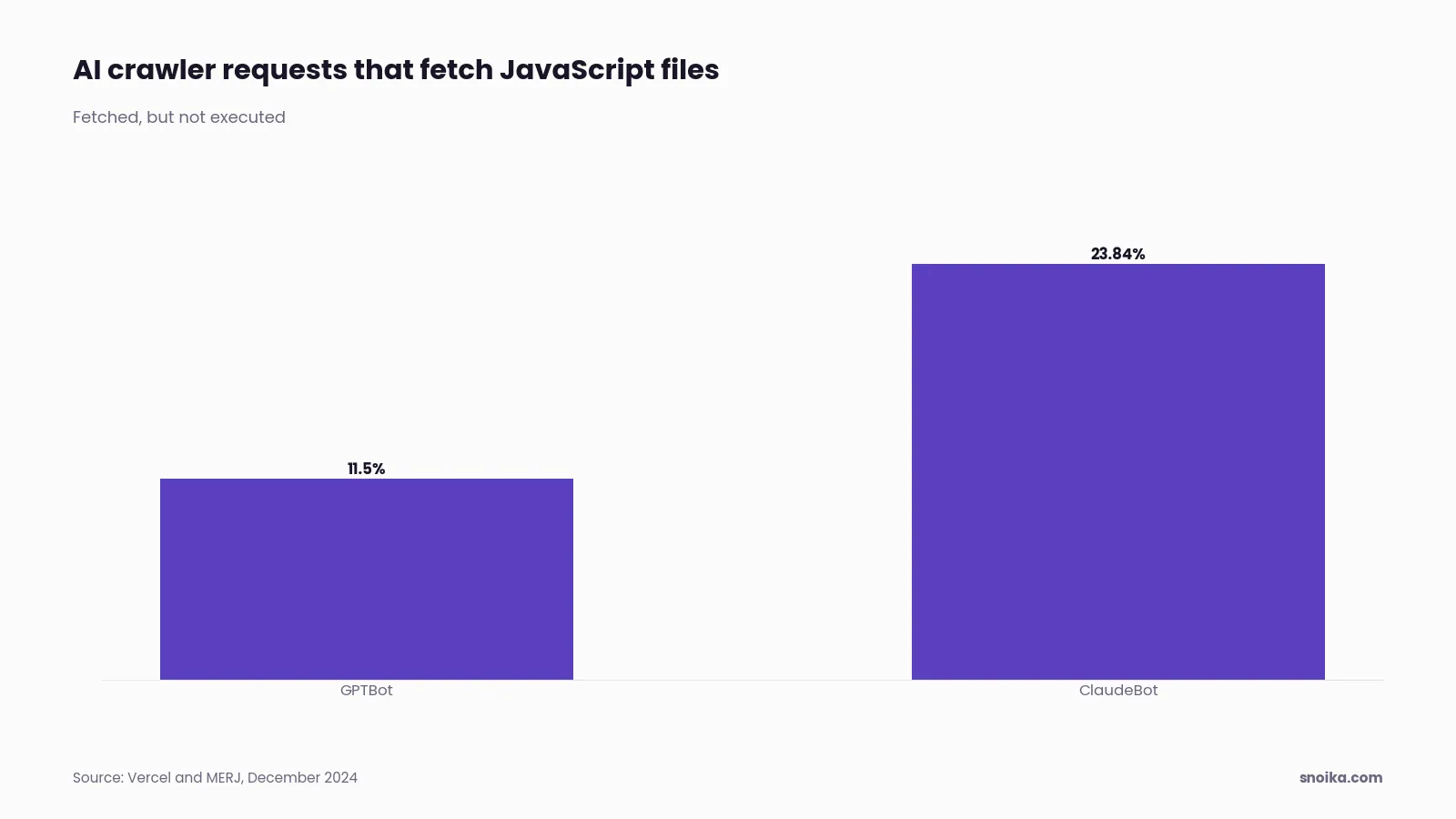
The technical fix that matters most is to serve your offer with its prices in the first HTML response, alongside the form, before any JavaScript runs. In December 2024, Vercel and MERJ studied real crawler traffic and found that all the major AI crawlers relied on content available before JavaScript execution. GPTBot fetched JavaScript files in about 11.5% of its requests and ClaudeBot in about 23.84%; both stopped at fetching those files. Content that appears only after client-side rendering doesn't exist for these crawlers.
Prioritize content in the initial response, then address crawler access and page stability:
- Use server-side rendering or static generation for landing pages built in frameworks such as React or Vue.
- Check robots.txt. OpenAI says your content can't appear in ChatGPT search summaries if you block OAI-SearchBot.
- Move important text out of tabs and accordions that load on click.
- Keep the page fast and stable, because layout shifts move buttons while an agent is trying to press them.
- Consider an llms.txt file, a markdown index of your key pages that Jeremy Howard of Answer.AI proposed on 3 September 2024. It's a proposal, not a standard, so treat it as an extra.
Content on your own domain builds your own authority. Snoika publishes pages through a DNS connection on the client's domain. This works on any CMS without a migration. The client approves each page in the dashboard before it goes live.
Audit your agent readiness score
You can audit agent readiness yourself in about an hour, and then decide whether the gaps need outside help. Start with the free checks below. They show what the agent sees, and that tells you how much work is ahead.
How to run a free check
- Open Lighthouse in Chrome 150 or later and run the Agentic Browsing category. Its experimental report uses a pass ratio in place of a 0 to 100 score.
- Run `curl` on your landing page URL and read the raw HTML. Make sure the offer terms include the price and that the form is also in the raw HTML.
- Open the Accessibility pane in DevTools and check the name of every button and form field.
- Paste the URL into the Schema.org validator and compare each value with the visible page.
- Ask an AI assistant with browsing to find your price and submit your form. Note where it stops.
Which audit options compare
| Option | What it covers | Cost (2026) | Suits |
|---|---|---|---|
| Free checks yourself | Lighthouse, raw HTML, schema validation | Plans on the pricing page | One or two landing pages and a developer on hand |
| In-house team | Fixes plus ongoing checks | Staff salaries | Large sites with engineering capacity |
| Agency | One-off audit report and fix list | Quoted per project | Teams that want a written plan and will build it themselves |
| Monitoring-only tool | Tracks brand mentions in AI answers, makes no fixes | Subscription | Teams that already have someone to make the fixes |
| Snoika | Site audit, AI visibility tracking, content and AI-ready site builds, with human review | Plans on the pricing page | Teams that want audit, content and tracking from one team |
Free checks yourself
- What it covers
- Lighthouse, raw HTML, schema validation
- Cost (2026)
- Plans on the pricing page
- Suits
- One or two landing pages and a developer on hand
In-house team
- What it covers
- Fixes plus ongoing checks
- Cost (2026)
- Staff salaries
- Suits
- Large sites with engineering capacity
Agency
- What it covers
- One-off audit report and fix list
- Cost (2026)
- Quoted per project
- Suits
- Teams that want a written plan and will build it themselves
Monitoring-only tool
- What it covers
- Tracks brand mentions in AI answers, makes no fixes
- Cost (2026)
- Subscription
- Suits
- Teams that already have someone to make the fixes
Snoika
- What it covers
- Site audit, AI visibility tracking, content and AI-ready site builds, with human review
- Cost (2026)
- Plans on the pricing page
- Suits
- Teams that want audit, content and tracking from one team
Who each option suits
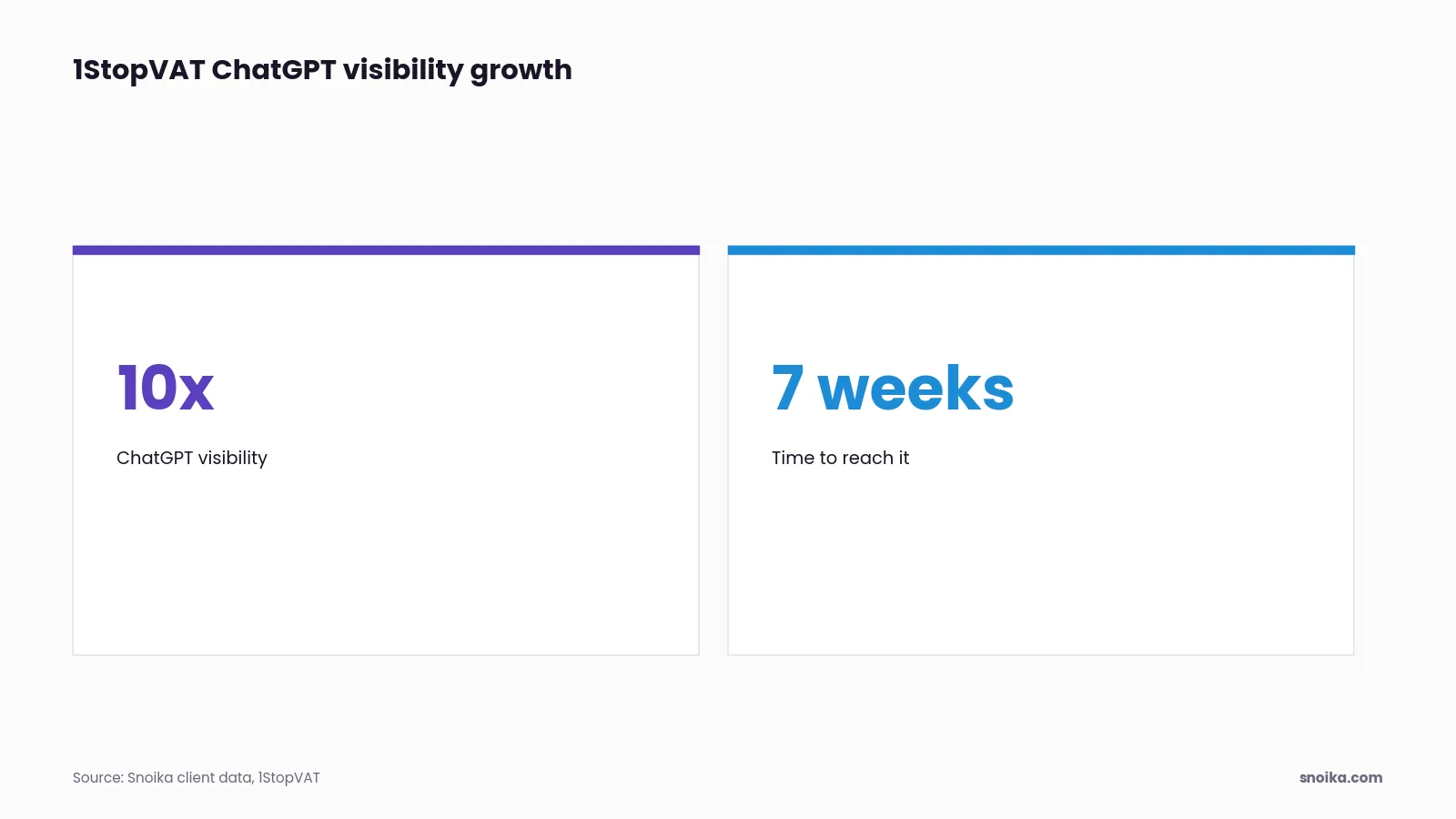
If you have one landing page and a developer, the free checks and the fixes in this guide are enough. Measuring whether the fixes worked is harder, because that means tracking how AI assistants describe you over time. Snoika uses weekly prompt sets in ChatGPT and Google AI Overviews to measure mentions and share of voice. It also measures sentiment and citations in those responses. 1StopVAT, in tax and fintech, saw 10x growth in ChatGPT visibility in 7 weeks. Pick a paid option when the audit turns up more fixes than your team can ship in a month, or when you need proof that the work changed what assistants say.
What to do next
Start with the `curl` check on the landing page that brings in the most revenue. If the offer terms with their price or the form are missing from the raw HTML, schema and labels can't help, because most AI crawlers never see the page. That one check tells you whether you need a rendering fix or only markup work. Then run it again after each release, because a new script or redesign can quietly break agent readiness on a page that passed last month.
We audit websites and track how AI assistants describe brands. We also build AI-ready websites from scratch. Every engagement starts with onboarding, where we learn your category and buyers. We ask for access to GA4 and Google Search Console, along with access to Google Tag Manager. If you'd like help with your pages, talk to an AI search expert.
FAQ
Put the offer in the initial HTML response and use descriptive headings. Check the raw HTML to confirm the offer is available before scripts run. Keep eligibility rules beside the offer they affect, rather than hiding them in click-to-load content.
Use a native HTML form with labeled inputs and a submit button that names the outcome. Give the form a submission URL and mark required fields. Include a visible confirmation message so the agent can tell whether its submission worked.
Write prices as HTML text, including the currency and billing period, with plan limits beside them. For custom pricing, explain what determines the amount and any minimum commitment. Check that visible prices match the structured markup and checkout.
Fix missing content in the initial HTML response first, using server-side rendering or static generation. Then check whether crawler access rules block the agents you intend to serve. Keep the layout stable so buttons don't move while an agent is using them.
Fixing the findings takes additional work. An outside audit is quoted per project, so there's no fixed price given.