
GA4 AI traffic reporting with Snoika
GA4 AI traffic reporting with Snoika gathers visits from ChatGPT and Perplexity into one channel you can read and puts the visibility data that explains them right beside it. Visits from Gemini and Copilot join them in the same channel. GA4 already records these sessions. Without setup, though, it files them under Referral and Direct, and a share ends up Unassigned. Give us GA4 access during onboarding. We'll group those sessions into one channel and set up the events that count each page's leads.
- Form submission
- CTA click
- Sign-up
Trusted by

























Snoika AI traffic in GA4
The pages we publish report to the GA4 property you already use, so every AI-referred visit to them shows up in your own reports. Pages go live on your own domain through a DNS connection. That connection sends one agreed path to the pages we host, and every other request goes to your existing site exactly as before.
Before launch, we build page templates that match your site. Then we set up GA4 and Google Tag Manager events on them, so each page's leads are tracked from its first visit. You can schedule finished pages, or you can schedule generation with automatic publishing when a page type doesn't need review. Before you start, check that the measurement ID on our pages matches the property your team reports from. A second property splits the data, and AI sessions look smaller than they are.
What GA4 AI channels show
GA4 has no default AI channel. Out of the box, it shows AI visits as Referral sessions, and some fall into Direct or Unassigned. The report is accurate. Its labels don't distinguish assistant traffic.
Where ChatGPT sessions appear
To see ChatGPT referral sessions, open the Acquisition section under Reports and select Traffic acquisition. Set the dimension to Session source / medium and filter for chatgpt.com. When the browser passes a referrer, Seer Interactive found these visits are recorded with Session medium = referral and source chatgpt.com. On 13 June 2025, ChatGPT began adding its UTM tag to links in its "More" sources list. SEO consultant Glenn Gabe wrote on X that day: "Heads-up, this should jump the traffic levels in GA4".
Why AI visits go missing
Sometimes the referrer gets lost. Digital Power, an analytics consultancy, explains that a visit with the UTM tag but no referring domain appears as Unassigned. App clicks with neither the tag nor the referrer land in Direct. We solve this with a custom channel group that matches AI domains and the ChatGPT tag. GA4 assigns each session to the first rule it matches, so the AI rule has to sit above Referral.
Which AI sources Snoika tracks
In GA4, we track referral sessions from ChatGPT and Perplexity. We also track Gemini and Copilot alongside other assistants. Each one is matched by its referring domain, and ChatGPT is also matched by its UTM tag.
| Assistant | Referring domain | How GA4 identifies it |
|---|---|---|
| ChatGPT | chatgpt.com | UTM tag and referrer |
| Perplexity | perplexity.ai | Referrer |
| Gemini | gemini.google.com | Referrer |
| Copilot | copilot.microsoft.com | Referrer |
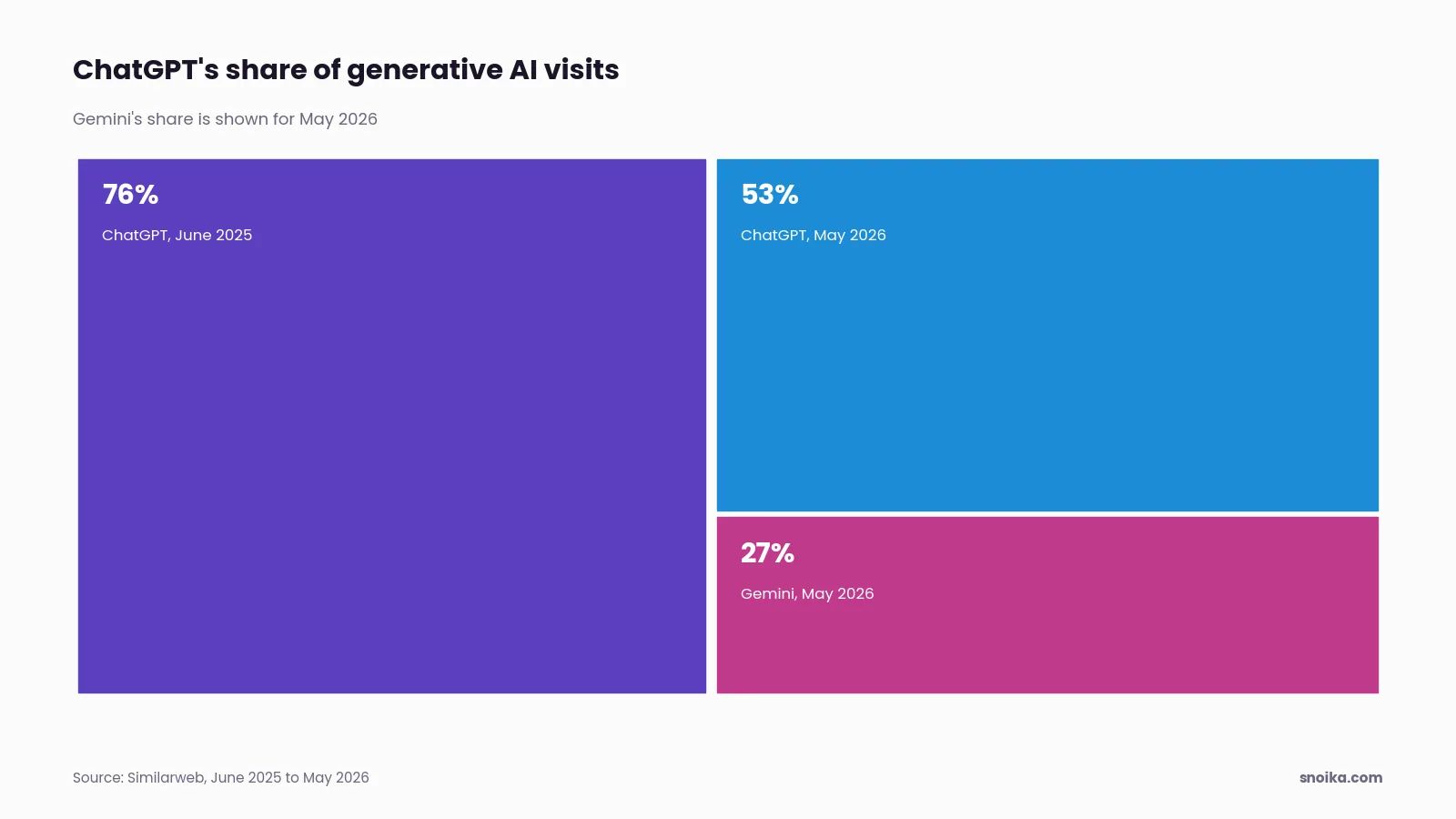
Similarweb's traffic panel shows ChatGPT's share of generative AI visits fell from 76% to 53% between June 2025 and May 2026, while Gemini's share rose to about 27%. A rule that matches only ChatGPT misses that growth. So we check the referral report for unfamiliar domains each month and add them to the channel rule.
Key events from AI sessions
You can tell whether AI-referred traffic converts by looking at key events tied to a lead. Filter them by the AI channel. We set up lead events in GA4.
Form submission
A completed contact or demo form on the page.
CTA click
A click on the page's main button, sent as its own event.
Sign-up
A trial or account created after the visit.
Contact click
A tap on a phone number or email link.
The proof shows up in volume over time. 3DPrinterOS achieved #1 visibility in ChatGPT for industry-specific queries and turned AI search into "a steady inbound lead source: 3–4 qualified inbound leads/day." Leads like these are only countable when each lead event is marked as a key event in GA4.
Tag Manager for CTA tracking
Google Tag Manager is how we track CTA clicks without changing your site code.
Map the CTAs
We list every button and form on the page templates we build.
Build triggers
Each CTA gets a click or form trigger in your container.
Send GA4 events
Each trigger fires a named GA4 event with the page path attached.
Mark key events
The lead events are flagged as key events in GA4.
Test in Preview
We click every CTA in Tag Manager's Preview mode before publishing the container.
GA4 access Snoika requires
An AI visibility tool needs read access to report on traffic. It also needs edit rights if it creates channel groups or key events. Google's Analytics Help says the Marketer role can create key events, and the Editor role has full control of property settings but can't manage users. During onboarding, we ask for access to GA4 and Search Console so AI visibility can be tied to the traffic you already measure. We also ask for Tag Manager access. The free AI visibility audit needs no access to any of your systems. Grant access at the property level, not the account level, so the permission covers only the site in scope.
Who receives this data
The data goes to the people who act on it, and your GA4 property stays yours throughout.
Marketing leads
They get our reports, with AI referral trends next to visibility data.
Analysts
They pull the same data into BI dashboards through the Snoika API.
AI assistant users
They query visibility data inside Claude or ChatGPT through our MCP server. The server also supports queries from Cursor.
Page owners
They review and approve every page in the dashboard before it goes live.
LLM traffic vs search traffic
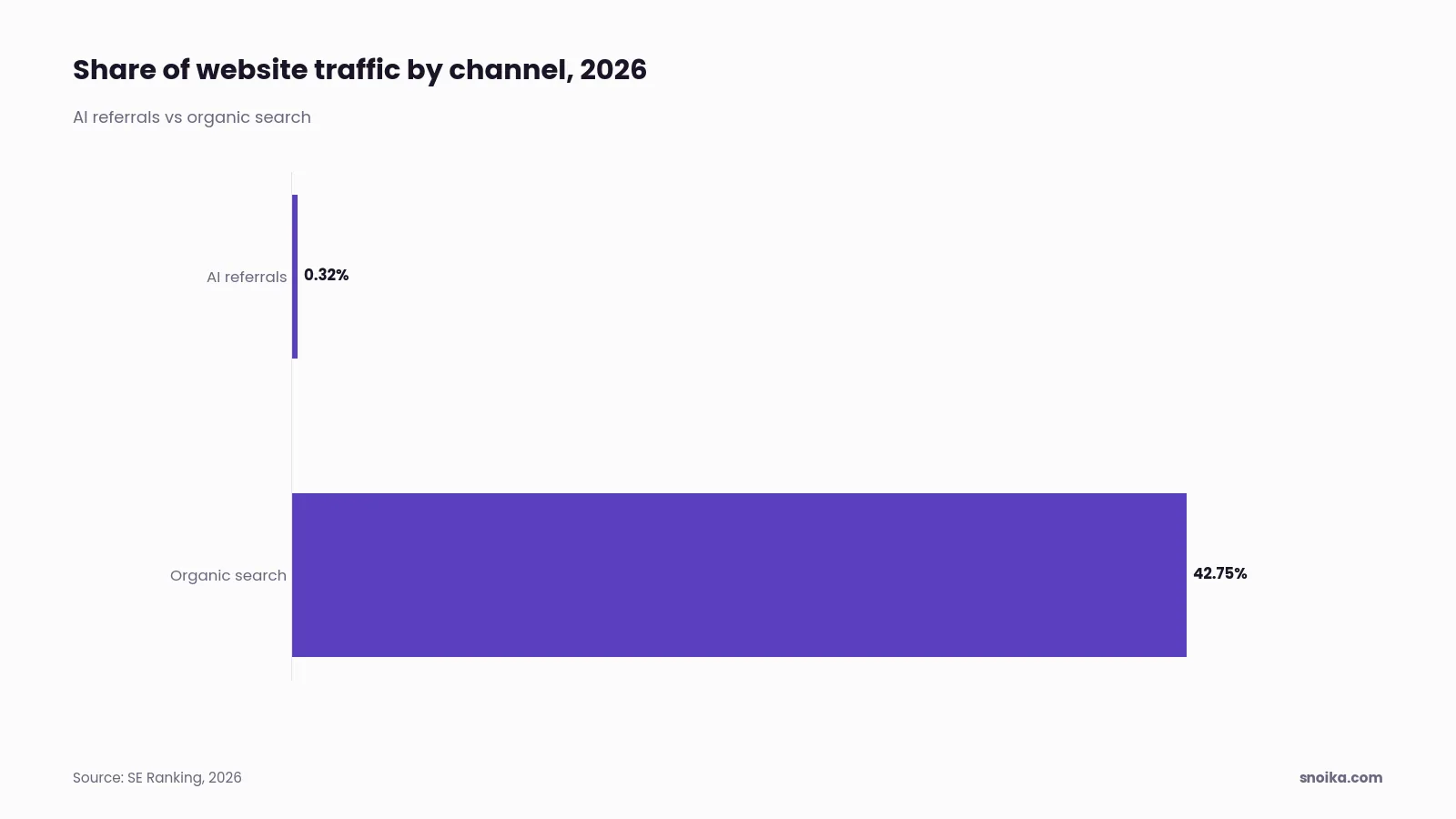
Large language model (LLM) traffic is still small next to search. SE Ranking measured AI referrals at 0.32% of website traffic in 2026, while organic search brought in 42.75%. Comparing the two at face value makes AI look negligible, so in our reports the useful comparison is conversion rate and lead quality per session. A click from Google AI Overviews arrives as google / organic, so GA4 can't separate it from a normal search click.
Interpreting AI referral trends
AI referral trends make sense only when you read them against visibility. Sessions follow citations, and an assistant has to mention you before anyone can click through. Our weekly prompt sets measure mentions and share of voice in ChatGPT and Google AI Overviews. They also measure sentiment and citations, so a rise in sessions can be traced back to a change in visibility.
In SE Ranking's data, AI referrals peaked in October 2025 at 0.3511% of traffic and then dipped through December. Before we read a monthly drop as lost visibility, we check whether it falls in that holiday window.
The AI traffic baseline begins on the day the channel group goes live, and we note that date in your reporting. Sessions classified before it won't match the numbers that come after.
FAQ
Open Reports, then Acquisition, then Traffic acquisition, set the dimension to Session source / medium and filter for chatgpt.com. Visits with a passed referrer appear there as referral sessions; app clicks with neither referrer nor tag land in Direct.
Snoika groups assistants into a custom AI channel that matches their referring domains and ChatGPT's UTM tag, with the rule placed above Referral. We check for unfamiliar referring domains each month and add new assistants to the channel.
Completed forms and sign-ups are the lead events we mark as key events in GA4, alongside CTA and contact clicks. Filtered by the AI channel, they show how AI-referred sessions convert.
Not reliably when both the referrer and the tracking tag are missing. Our channel rules match every available domain or tag, so only app visits without either identifier stay in Direct.