7 Ways AI has changed software development in 2026

Content authorMaksym KindrativPublished onReading time5 min read
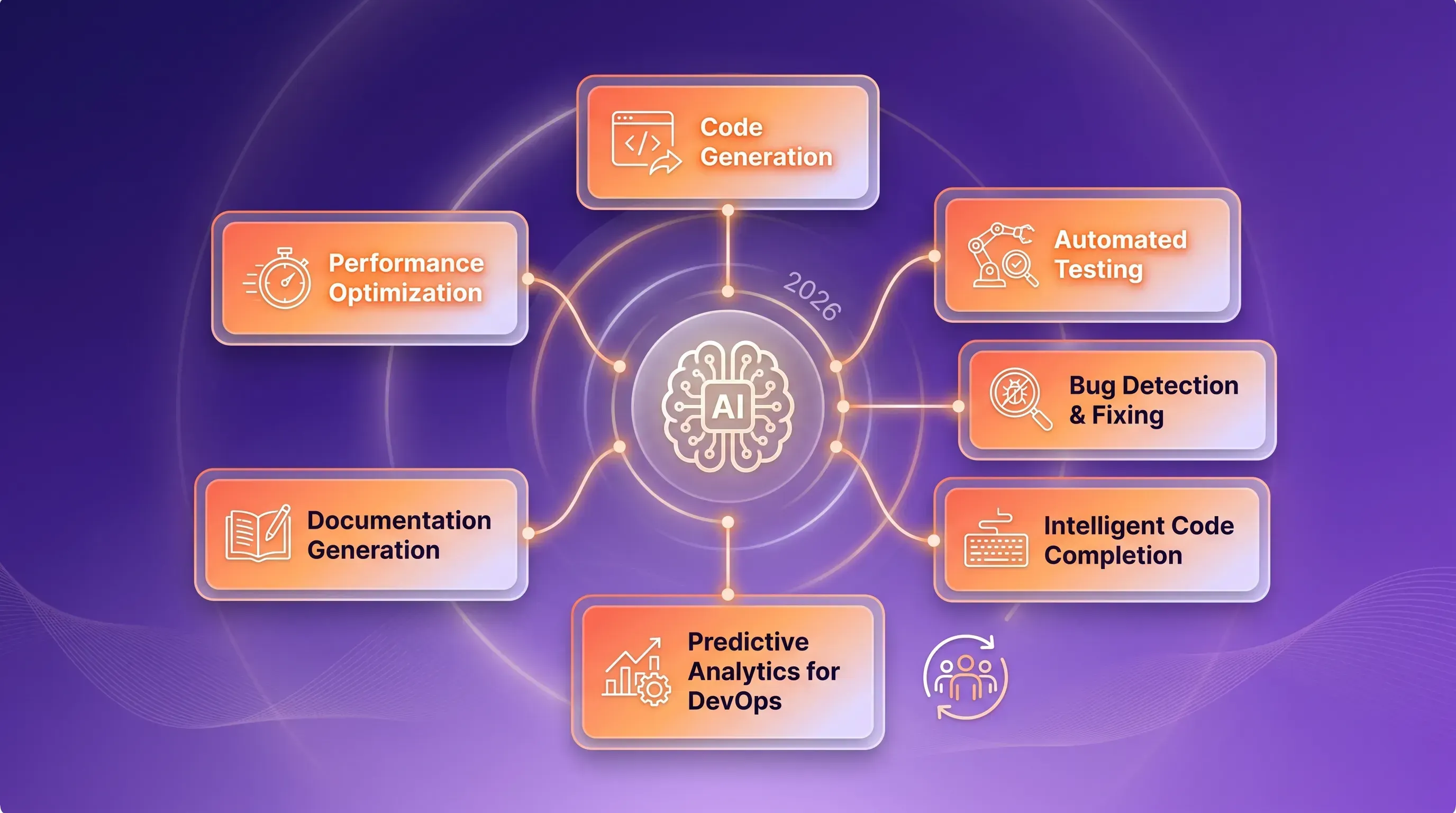
A vibrant abstract illustration showing 7 distinct AI implementation methods in software development, centered around a glowing AI hub.

In 2026 software development is no longer a writing code. Now it is an AI-supported process. AI helps at every stage from planning the architecture to watching the app in production. Big industry surveys prove this. According to the Stack Overflow Developer Survey 2025, 84% of developers already use AI tools or plan to use them (up from 76% the year before). Also, 51% of professional developers use AI every day.


1. AI helps write code

In the past, developers spent a lot of time writing repeated code, building basic API structures, and using standard patterns by hand.

Now, AI tools can write code from a simple description in plain language. This saves time and reduces mistakes. Tools like GitHub Copilot understand what the developer wants and suggest ready-to-use code. This lets developers focus on the logic of the program, not on small syntax details.

It's interesting to see which tools people actually use. ChatGPT is the most popular AI model for coding (82% of AI users), and GitHub Copilot is used by 68% of developers. New tools like Cursor (18%) and Claude Code (10%) are also growing fast, according to Stack Overflow's 2025 data.

2. AI helps find and fix bugs

Fixing bugs in complex systems used to be slow. It usually meant reading logs by hand and guessing what went wrong.

AI can look at error logs, system behavior, and code history to find the real cause of a problem and suggest a fix. It works like a "first-line" engineer that helps before a human even looks at the issue. But this is also where AI still has problems. The same Stack Overflow survey found that 45% of developers say fixing AI-written code actually takes more time than writing the code themselves. So today, AI debugging works best as a helper that points you in the right direction not as a full replacement for a human review.

Need help with your AI visibility?

Book a free consultation with our experts we'll help you determine exactly which services your organization needs.

3. AI powers automated testing

Manual testing (QA) simply cannot keep up with fast release schedules and complex modern systems.

AI can create test cases, find tricky edge cases, and decide which tests are most important to run first. This gives better test coverage with less human work. Right now, developers are already comfortable letting AI handle some testing. They plan to give AI even more control over testing and documentation in the next 3–5 years this is one area where trust in AI is growing faster than in other areas, like deployment or project planning.

4. AI writes documentation

Documentation often becomes old, incomplete, or is simply missing.

AI can automatically create and update technical documentation straight from the codebase. It can turn complex functions, APIs, and systems into explanations that are easy for humans to read. Along with testing, documentation is one of the tasks developers are most happy to give to AI, because the risk of a serious mistake is lower than in tasks like deployment or production monitoring.

5. AI reviews and improves code

Manual code reviews are slow. They can also be subjective and different from one team to another.

AI can scan pull requests, spot "code smells" (signs of bad code), and suggest improvements. This helps keep code clean and reduces technical debt over time. But there is a warning here too. In a report called Predicts 2026: AI Potential and Risks Emerge in Software Engineering Technologies, Gartner predicts that by 2028, the "prompt-to-app" approach used by non-technical ("citizen") developers could cause software bugs to increase by 2,500% — if companies don't add proper checks and rules. This means AI code review should not replace human oversight. It should work alongside it, as an extra layer of quality control.

Need help with your AI visibility?

Book a free consultation with our experts we'll help you determine exactly which services your organization needs.

6. AI helps understand big codebases and architecture

Large codebases are hard to understand, especially for new engineers joining a team.

AI can act like a "knowledge layer" for the whole system. It explains the architecture, shows how different parts depend on each other, and traces the logic flow. This helps new team members get started instantly and helps everyone make decisions faster. Gartner predicts that by the end of 2026, 75% of developers will manage ("orchestrate") AI agents instead of writing all the code by hand. This is a big shift: the developer's job changes from "code writer" to "architect and checker" of AI-generated solutions.

7. AI improves security

Security problems are often found too late sometimes only after the software is already live.

AI can constantly scan code to find issues like injection attacks, wrong configuration settings, and unsafe outside dependencies. It works directly inside CI/CD pipelines (the automated systems that build and release software). This matches a bigger Gartner prediction: by 2028, over 50% of companies will use special AI security platforms to protect their AI systems. Security will also become more "preventive" stopping problems before they happen, instead of reacting after.

Conclusion: balancing speed and trust

By 2026, software development is no longer only human work. It is a system of constant improvement, powered by AI. Looking at all seven areas, one pattern is clear:

  • Coding becomes AI-assisted

  • Debugging becomes predictive

  • Testing becomes automated

  • Documentation writes itself

  • Reviews become smarter

  • Architecture becomes easier to explain

  • Security becomes proactive

But the data also shows a gap: AI use (84%) is growing much faster than trust in AI (only 29% of developers trust AI's accuracy, according to Stack Overflow). The companies that will win in 2026 are not the ones who simply "turn AI on everywhere." They are the ones who add governance, testing checks, and architecture oversight alongside their AI tools turning speed into real, lasting quality, instead of a new kind of technical debt.

Need help with your AI visibility?

Book a free consultation with our experts we'll help you determine exactly which services your organization needs.

Start small. Pick one team and one clear task, like writing tests or reviewing pull requests, and try an AI tool such as GitHub Copilot or Cursor there first. Gartner recommends checking how mature your current engineering process is before adding AI agents, since a messy process only gets worse with AI. Measure the results for a few weeks, then set simple rules for which tasks AI can do alone and which still need a human check, and grow from there.

An AI hallucination is when the AI gives an answer that sounds correct but is actually wrong, like inventing a function that doesn't exist. The best defense is grounding the AI in your real codebase and documentation instead of letting it guess from memory, combined with automated tests and static analysis that catch mistakes early. For anything touching security, payments, or user data, a human should always review the AI's output before it goes live. Even the newest models still make mistakes, so the real goal is catching errors before they reach production, not reaching zero hallucinations.

AI coding tools are moving from flat monthly prices to pay-per-use token pricing, which makes costs harder to predict. Gartner found that 23% of tech leaders already pay $200 to $500 per developer per month just for AI coding tokens. To control this, match the model to the task by using cheaper models for routine work and saving powerful ones like Claude Opus for complex jobs, and track spending by team so you know where the money goes. Training developers in "context engineering," meaning giving the AI only what it truly needs, also cuts token costs significantly. Finally, measure success through delivery speed and code quality, not just how much code AI produced.

Three tools currently lead the market. GitHub Copilot is the easiest to set up and a safe starting point for teams already using GitHub. Cursor is a full AI-native code editor, great for everyday coding and multi-file edits. Claude Code is a terminal-based agent best suited for complex work like large refactors and deep debugging in big codebases. Many teams combine an IDE tool like Cursor or Copilot for daily work with Claude Code for the harder tasks, and tools like Windsurf or Amazon Q Developer fit specific niches, such as AWS environments.

According to Stack Overflow, 76% of developers don't plan to let AI handle deployment and production monitoring, and 69% feel the same about project planning. Security-critical code also needs human review, since Veracode research found that a large share of AI-generated code fails security tests. High-level architecture decisions and final pull request approvals should stay human too, because they require judgment and business context that AI doesn't fully have. A simple rule to remember: the more risk a mistake carries, whether legal, financial, or safety risk, the more a human needs to stay in control.

It depends on your team and budget. Small teams wanting an easy, low-cost start should try GitHub Copilot, around $10 a month with strong IDE support. Teams wanting a full AI-native editor often prefer Cursor, around $20 a month, while teams doing large refactors or deep debugging usually get more value from Claude Code's stronger reasoning. Enterprise teams with compliance needs often choose GitHub Copilot Enterprise for its legal protection against AI-related code issues. Many professional teams don't pick just one; they combine an IDE tool like Cursor or Copilot with a terminal agent like Claude Code for harder tasks.

Schedule a Meeting

Book a time that works best for you

You Might Also Like

Discover more insights and articles

Luminous SaaS marketing illustration featuring a flowchart of six UI cards representing stages in a ChatGPT SEO workflow over a deep purple background.

ChatGPT SEO: A Practical Workflow for Better Visibility

This article walks through a six-stage ChatGPT SEO workflow you can run on every piece you publish. It shows where the model earns its place and where your own judgment stays in charge after dedicated tools confirm the data.

Comparison visual of AI search optimization tools with overlapping cards for Tool A and Tool B, featuring charts and evaluation criteria.

Choosing AI search optimization tools for your team

This article clears up the confusion between AI visibility tools and the keyword trackers you already run, then walks through the criteria that matter when you're buying for a team. By the end, you'll be able to run a fair trial and defend your pick.

A modern SaaS dashboard featuring a central 'LLM SEO Framework' card surrounded by four pillar cards, all on a deep purple gradient background.

LLM seo: a practical framework for AI visibility

This article gives you a vendor-neutral framework for LLM SEO, the practice of getting your brand cited inside AI-generated answers and included when those answers discuss your category. It explains source selection and measurement, with the carryover from your existing program built into the signal framework.

A luminous SaaS marketing illustration with a central UI card labeled 'AI Answer Engine Citations' surrounded by seven floating cards.

How to Improve Your AI Visibility and Get Cited by Answer Engines

This article explains the mechanics of how AI answer engines decide which sources to name and link, then walks through the concrete moves that raise your odds of being cited. It treats AI visibility as its own discipline next to the SEO you already run and shows where the two overlap before ending with what to audit and how to measure progress.