
Product feeds for AI shopping assistants
A product feed for AI shopping assistants is a structured file of your catalog. Each row describes one item, and Google's Shopping Graph and ChatGPT read those rows to decide which products to show, at what price and whether they're in stock. Shoppers ask assistants long, specific questions, so the feed has to carry details such as color and size in fields a machine can read without guessing. Material and price need machine-readable fields too.
 Denys SuliatytskyiHead of Growth, Snoika · 8 min read

























Feed structure for AI surfaces
An AI-ready feed has one row per variant. Each row has a stable ID, and a shared group ID ties the sizes and colors of one product together. Google and OpenAI both read the feed as their main record of what you sell, and the scale shows why. Google says its Shopping Graph holds more than 50 billion product listings, and 2 billion of them are refreshed every hour. A listing that's sparse or out of date loses to the many listings that aren't.
The two specs overlap more than they differ. That means you can keep one master catalog and send a version shaped for each channel. The table sets the core structural rules side by side.
| Attribute | Google Merchant Center | OpenAI product feed |
|---|---|---|
| Identifier | `id`, unique per variant | `id`, max 100 characters |
| Title length | 1 to 150 characters | Max 150 characters |
| Description length | Max 5,000 characters | Max 5,000 characters |
| Category | Optional, Google can auto-classify | Required, per Malcolm Gibb's spec comparison |
| Return policy | Set at account level | Set per product |
| Platform-only fields | Custom labels 0 to 4 | `enable_search`, `enable_checkout` |
| Refresh | Scheduled fetch or API | Pushed every 15 minutes at most |
Identifier
- Google Merchant Center
- `id`, unique per variant
- OpenAI product feed
- `id`, max 100 characters
Title length
- Google Merchant Center
- 1 to 150 characters
- OpenAI product feed
- Max 150 characters
Description length
- Google Merchant Center
- Max 5,000 characters
- OpenAI product feed
- Max 5,000 characters
Category
- Google Merchant Center
- Optional, Google can auto-classify
- OpenAI product feed
- Required, per Malcolm Gibb's spec comparison
Return policy
- Google Merchant Center
- Set at account level
- OpenAI product feed
- Set per product
Platform-only fields
- Google Merchant Center
- Custom labels 0 to 4
- OpenAI product feed
- `enable_search`, `enable_checkout`
Refresh
- Google Merchant Center
- Scheduled fetch or API
- OpenAI product feed
- Pushed every 15 minutes at most
Before you build anything, check that your IDs never change when a product is edited or restocked. When an ID changes, both platforms treat the item as brand new and its history is lost.
Attributes AI assistants parse
Google's AI shopping needs the same core attributes as a standard Shopping feed. Each row needs an ID, with a title and description to describe the item. Supply a link and image link for it. Price and availability are required, as are brand and a product identifier. Apparel also needs color and size, with gender and age group specified. The difference with AI surfaces lies in how hard the optional fields work, because an assistant breaks one conversational question into a set of attribute filters.
Required fields both platforms check
Both platforms require an ID and title on every row. A description must accompany the landing page link and main image. Price and availability are also mandatory; a row missing any of these fields is rejected. Google asks for brand only when a product has a clear brand or manufacturer, but OpenAI wants it on every row. A product that passes Google's checks can still fail the OpenAI profile, as CommerceClarity notes in its field-by-field mapping.
Attributes that answer conversational queries
CommerceClarity illustrates how assistants use optional fields with the query "waterproof trail shoe, black, size 10, under 100 euro." To answer it, the feed needs color and size. Material must also be specified, along with price and availability. Treat material and pattern as required for any category where shoppers ask about them. Apply the same rule to weight and product dimensions.
Identifiers and when to leave them out
The Global Trade Item Number (GTIN) is the barcode number that lets Google match your item to the same product sold elsewhere. Google's own help page says "products with missing or incorrect GTIN attributes may have limited visibility." Follow its guidance by sending brand plus the Manufacturer Part Number (MPN) for store-brand and custom goods without a barcode. A made-up GTIN does more damage than a missing one.
Titles for AI retrieval
To optimize titles for AI retrieval, put the product type and its deciding attributes first, and write the title for the attribute order your category uses. Google allows 150 characters but displays only about 70. In its help article on long text, Google writes that it "[strongly encourage[s] you to submit titles with 70 or less characters](https://support.google.com/merchants/answer/14989281?hl=en) whenever possible." An assistant reads the whole string, though. So the first 70 characters have to work for a human, and the rest can carry attributes for the machine.
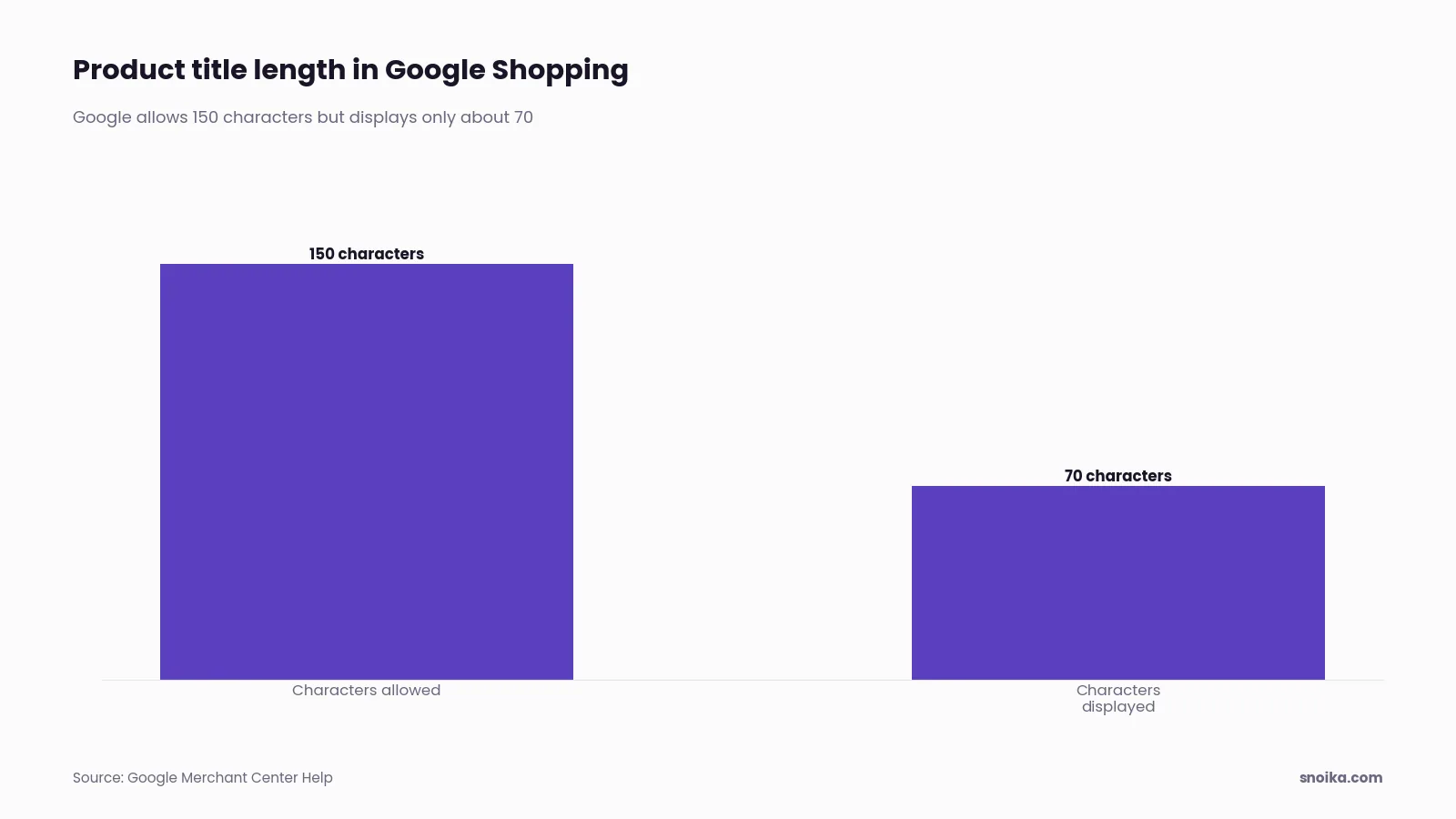
Google trims "Nexus 7 tablet in black with 32 GB of storage" to "Nexus 7 tablet, 32 GB, black" in its own example. Each comma-separated chunk is an attribute a model can lift out. Write each title in this order:
- Start with the brand if shoppers search by it. If they don't, open with the product type.
- Add the attribute that decides the purchase in your category. For electronics, use specs; for clothing, use fabric and fit.
- Add the variant's color and size if they match the row's own attribute fields. Do the same for capacity.
- Remove promotional text such as "free shipping" or "best deal" because it triggers disapprovals. Remove ALL CAPS for the same reason.
- Read the first 70 characters alone and check that they still name the product.
If you supply ChatGPT through its Google-compatible path, keep the full title in the plain `title` field because OpenAI maps that field exclusively. Copy any title text held in Google's `structured_title` into the plain field.
Custom labels that help ranking
The custom labels that improve rankings sort products by business value, such as margin band or season. Sales performance and price band are other useful criteria. They work through bidding. Google's spec says custom labels 0 to 4 let you build campaign filters; it supports them in Performance Max, Shopping, or Demand Gen campaigns. It also states that "the information you include in this attribute won't be shown to customers." Labels let you bid harder on the products worth winning, which lifts their paid placement. Their ranking benefit is confined to paid results.
A common scheme gives each of the 5 slots one job:
- `custom_label_0`: margin band (high, medium, low)
- `custom_label_1`: season or promotion window
- `custom_label_2`: sales performance (best seller, long tail, no sales)
- `custom_label_3`: price band
- `custom_label_4`: release year or collection
Plan the values before you fill them in. Google caps each label at 1,000 unique values across the account and won't raise the limit. Values past the cap are ignored for reporting and bidding. That's why a SKU or product ID never belongs in a label. Labels group products, while the `id` field identifies them.
Google product feed setup
You set up a Google product feed in Merchant Center. The steps below take a new store to approved listings. Time varies with catalog size, and most of the effort goes into step 4.
- Create a Merchant Center account. Then verify and claim your website domain.
- Set shipping rates and your return policy at account level. Google won't approve products without them.
- Choose a data source. Store-platform integrations suit catalogs that already live in Shopify or a similar platform. A scheduled file or Google Sheet suits small catalogs. Use the API for catalogs where prices change during the day.
- Map your catalog fields to Google's attributes. Fill in every attribute your category uses, and pay most attention to identifiers and variant fields.
- Set the fetch schedule to match how often prices and stock change. Daily is the floor for most stores.
- Turn on automatic item updates, so Google can correct price and availability from your page's structured data when the feed lags.
- Open the diagnostics tab after the first fetch, and fix item-level issues before you launch campaigns.
- Enable free listings so the products can appear on organic Shopping surfaces such as AI Mode.
You'll know the setup worked when diagnostics show the large majority of items as approved and the Products view lists no account-level issues.
ChatGPT shopping feed requirements
To structure a feed for ChatGPT shopping, follow OpenAI's product feed spec. It uses the same core fields as Google, plus two flags. `enable_search` lets ChatGPT show the product, and `enable_checkout` lets shoppers buy it inside the chat. Checkout only works when search is also on. Turning on checkout also makes two more fields required, `seller_privacy_policy` and `seller_tos`.
ChatGPT requires an application through its merchant portal and business verification by OpenAI, a different process from Google's. Next you push a sample of about 100 products for schema checks. Alhena's 2026 setup guide says the full process takes one to two weeks from application to live products. Accepted formats include compressed JSON Lines and CSV, all in UTF-8.
Your fields also decide which store ChatGPT sends the buyer to. OpenAI's release notes say that when a shopper picks an item, ChatGPT ranks merchants "by factors like inventory, price, quality, primary seller status, and Instant Checkout availability." Accurate stock counts and current prices therefore carry real weight. Check three things before launch:
- Every row has a brand and a `product_category` path.
- Return policy and return window are set on each product, because OpenAI doesn't read Google's account-level settings.
- Review count and rating fields are filled in wherever you have real review data.
Fixing common feed rejections
Mismatches between the feed and the landing page cause most feed rejections, while missing identifiers or rule-breaking text account for the rest. Google's crawler compares your feed price with the price on the page and in its structured data. As Google's help page on mismatched prices puts it, "the product with the mismatch may be disapproved." Once the prices match again, the product is reapproved after the next crawl, and requesting a website check speeds that up.
| Rejection | Usual cause | Fix |
|---|---|---|
| Mismatched price | Sale price live on site but not in feed, or tax shown differently | Sync feed refresh with price changes, then match the page's structured data |
| Mismatched availability | Feed says in stock, page says sold out | Refresh stock more often, turn on automatic item updates |
| Limited performance, missing GTIN | Barcode not supplied | Add the real GTIN, or brand plus MPN for unbarcoded goods |
| Image too small or has overlays | Thumbnail used, promo text on image | Supply the full-size clean product shot |
| Promotional text in title | "Sale" or "free shipping" in title | Move offers to the `sale_price` and shipping fields |
| Missing brand or category (OpenAI) | Field left blank because Google allowed it | Fill both on every row |
Mismatched price
- Usual cause
- Sale price live on site but not in feed, or tax shown differently
- Fix
- Sync feed refresh with price changes, then match the page's structured data
Mismatched availability
- Usual cause
- Feed says in stock, page says sold out
- Fix
- Refresh stock more often, turn on automatic item updates
Limited performance, missing GTIN
- Usual cause
- Barcode not supplied
- Fix
- Add the real GTIN, or brand plus MPN for unbarcoded goods
Image too small or has overlays
- Usual cause
- Thumbnail used, promo text on image
- Fix
- Supply the full-size clean product shot
Promotional text in title
- Usual cause
- "Sale" or "free shipping" in title
- Fix
- Move offers to the `sale_price` and shipping fields
Missing brand or category (OpenAI)
- Usual cause
- Field left blank because Google allowed it
- Fix
- Fill both on every row
Fix the cause in your source data. A manual patch is overwritten at the next fetch, and the rejection comes back.
Measuring feed performance
You measure feed performance on two levels. Use the channels' own reports for clicks and impressions, and track visibility in AI answers, where AI product recommendations matter as much as clicks. Merchant Center's performance reports cover Google surfaces. Google Analytics 4 (GA4) shows referral sessions from AI assistants landing on product pages.
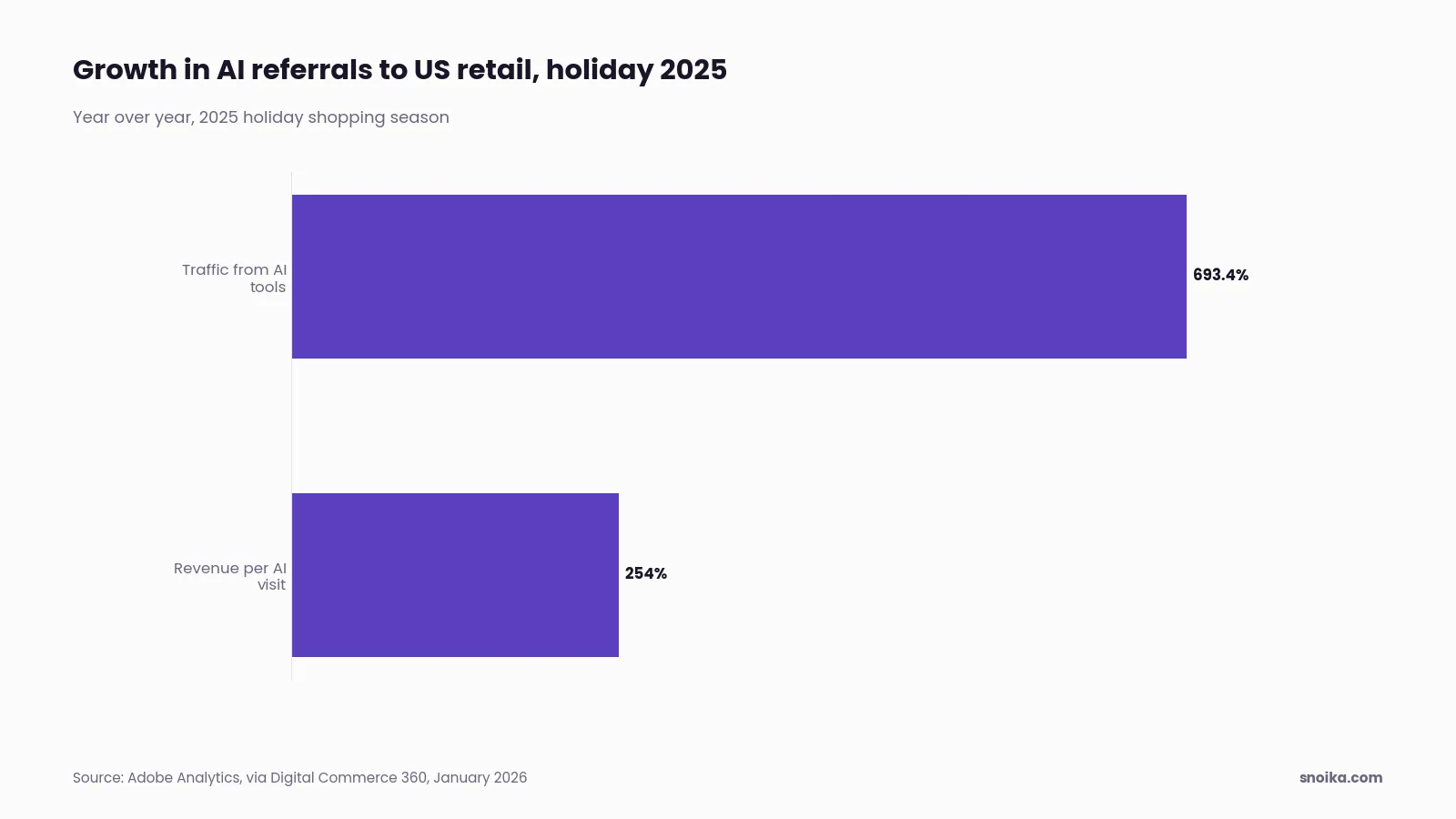
The traffic is small but growing fast. Adobe Analytics found that traffic to US retail sites from generative AI tools rose 693.4% year over year in the 2025 holiday season. Digital Commerce 360 also cited Adobe's finding that revenue per visit from AI referrals increased 254% year over year. Measure those referrals separately from organic search, or the gains disappear into your totals.
Clicks only show the visits you won. To see the answers that left you out, you need prompt tracking. That means running the same set of shopping questions every week and recording which brands each assistant names. Snoika's tracking runs weekly prompt sets in ChatGPT and Google AI Overviews to record mentions and share of voice. It also records sentiment and citations. The before-and-after numbers make a feed fix measurable. Snoika's founder Anton Vedeshin reported to Startup Reporter 1StopVAT's move from 2.7% to 28.3% ChatGPT visibility in 16 weeks.
Who should manage the feed
Choose who runs product feed management based on catalog size and how often your data changes. Building the feed and checking whether AI assistants actually show your products are separate jobs, and each option below covers a different part of the work.
| Option | What it covers | Cost (2026) | Suits |
|---|---|---|---|
| In-house feed specialist | Full control of data and fixes | $60,000 to $85,000 a year | Large catalogs with daily price changes |
| Feed management platform | Rules, channel mapping, scheduled exports | $300 to $2,000 a month by catalog size | Stores with a person who can own the rules |
| Ecommerce ads agency | Feed work bundled with campaign management | $2,000 to $5,000+ a month flat fee | Brands whose budget goes mostly to Shopping ads |
| AI visibility platform (Snoika) | Tracks whether assistants mention your brand, but doesn't build the feed | Plans on the pricing page | Teams that need proof the feed changes AI answers |
In-house feed specialist
- What it covers
- Full control of data and fixes
- Cost (2026)
- $60,000 to $85,000 a year
- Suits
- Large catalogs with daily price changes
Feed management platform
- What it covers
- Rules, channel mapping, scheduled exports
- Cost (2026)
- $300 to $2,000 a month by catalog size
- Suits
- Stores with a person who can own the rules
Ecommerce ads agency
- What it covers
- Feed work bundled with campaign management
- Cost (2026)
- $2,000 to $5,000+ a month flat fee
- Suits
- Brands whose budget goes mostly to Shopping ads
AI visibility platform (Snoika)
- What it covers
- Tracks whether assistants mention your brand, but doesn't build the feed
- Cost (2026)
- Plans on the pricing page
- Suits
- Teams that need proof the feed changes AI answers
For a store under a few thousand SKUs, use a feed platform with one owner on staff, and add an agency only when ad spend justifies the fee. Large catalogs earn back a specialist's salary. Whichever option builds the feed, you still need weekly generative engine optimization data. That data shows whether feed optimization improves visibility on the surfaces where AI shoppers now start.
What to do next
Check your feed against the OpenAI spec this week, even if Google already approves every item. The gaps that block ChatGPT are fields Google allowed you to skip, such as brand and category. Per-product return policies are another gap. They take a few hours to fill and decide whether the product feed reaches a second assistant at all. Once the feed passes, measure whether ChatGPT and AI Overviews actually name your products, because approval alone doesn't tell you that. We track brand mentions and share of voice across AI assistants every week, with a human review layer on top of the automated runs. To see where you stand today, get a free AI visibility report.
FAQ
Google's AI shopping uses standard Shopping requirements, including price and availability. The product feed also needs identifying information and product-page details, with extra requirements for apparel. Add material and dimensions where relevant, because assistants use these attributes to match specific shopping questions.
Use one row per variant with a stable ID, and connect related variants through a shared group ID. Include the core shopping fields, ensuring every row has a brand and category. Set return terms per product, and enable search before enabling checkout.
Labels such as margin band and season can support paid placement by grouping products for bidding. They don't improve organic rankings. Give each label a consistent purpose, and keep its values below the 1,000-value account limit so they remain available for reporting and bidding.
Put the product type and deciding attribute first, unless shoppers primarily search by brand. Keep the product identifiable within the first 70 characters, and use the remaining space for relevant variant details. For ChatGPT's Google-compatible feed path, keep the complete text in the plain title field.
No, approval confirms that listings passed the channel's checks, but it doesn't establish visibility in AI answers. Track a consistent set of shopping questions weekly to see whether products appear. Compare those results with referral traffic to distinguish mentions from visits.
Keep reading
All articles

